What’s new in OpenText Content Management


OpenText™ Content Management (Extended ECM) enterprise content management software integrates business content with leading ERP, CRM, HCM applications, seamlessly connecting people with information and accelerating end-to-end business. Check out the latest updates and innovations from the most recent releases.
June 2026: What’s new in OpenText Content Management 26.2
OpenText Content Management 26.2 introduces the first agentic capabilities in OpenText Content Aviator and practical enhancements that help customers modernize, administer, and use the platform more effectively.
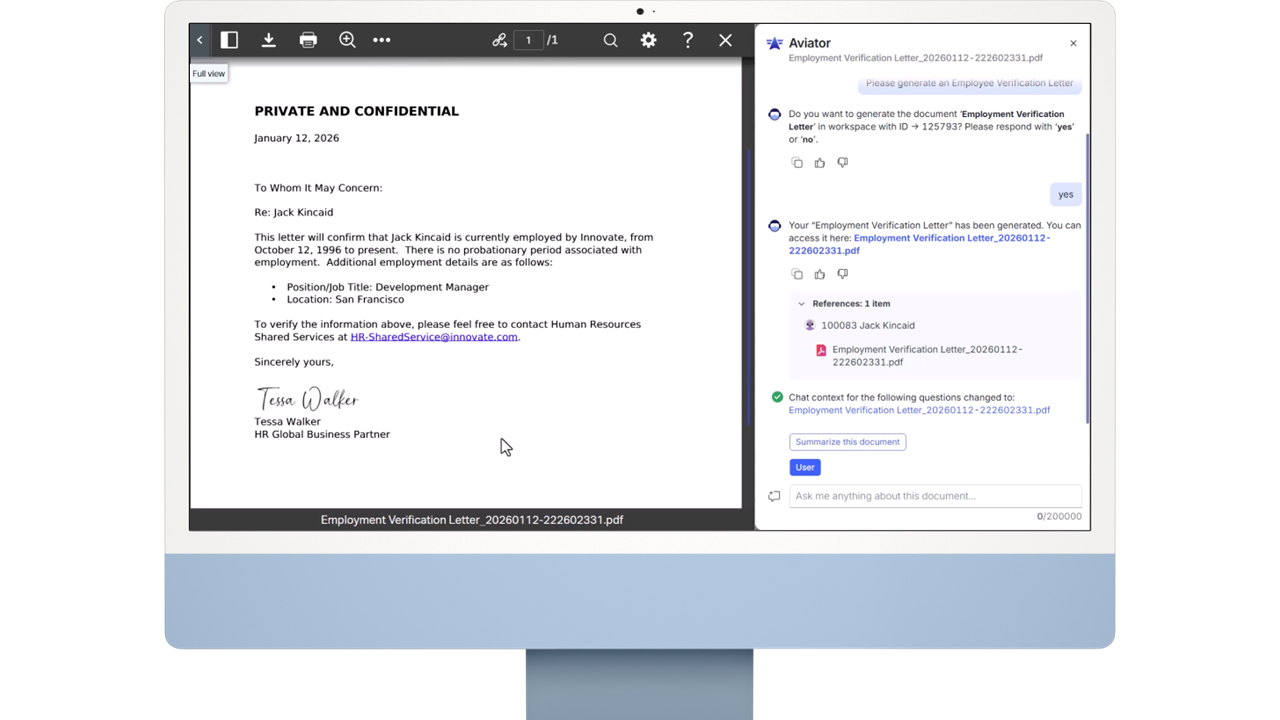
New agentic capabilities in Content Aviator
Content Aviator continues to evolve from an AI content assistant into a more action-oriented experience for everyday content work. In 26.2, users can ask Content Aviator to help complete common tasks that previously required manual navigation, menu clicks or specialized system knowledge.
New agentic capabilities include:
- Document generation: Find the right template and generate a completed document using a natural language request.
- Document management: Move, copy, rename and delete objects in OpenText Content Management.
- User management: Interact with favorites, reserved items and user information to support daily work.
- Metadata assistance: Read and update categories and attributes, including populating attributes based on content.
- Knowledge graph navigation: Use workspace relationships to find related information and improve answer quality.
- Records management: Perform records actions, such as placing a document on hold, through a natural language conversation.
Together, these updates help users act on governed content more intuitively while keeping enterprise controls in place.
A clearer path from on-premises to private cloud
Content Management 26.2 introduces our first steps toward a better technical foundation for migrating from on-premises to OpenText Private Cloud. The initial release of this enhanced migration tooling represents an important first step toward making private cloud modernization clearer, safer, and more repeatable for customers. And this is only the starting point. Customers should expect this migration experience to continue expanding in future releases, with broader coverage, more automation, and greater visibility across the modernization journey.
For organizations modernizing their content foundation, this helps reduce migration uncertainty with earlier insight into readiness, dependencies and migration scope. It also helps move business context forward by bringing supported content and configurations into private cloud—preserving what matters while reducing legacy complexity and creating a stronger foundation for agentic AI.
Smarter administration, governance, and operations
Content Management 26.2 includes several enhancements designed to simplify administration, improve operational efficiency and strengthen governance, including:
- Business Administrator home page: Provides an out-of-the-box view with preconfigured widgets and relevant status metrics.
- Expanded Business Administrator access: Opens WebReports administration pages and Usage Privilege administration to Business Administrators.
- Records Management metadata bulk updates: Adds Records Management Metadata Bulk Update Rules in Smart View for large volumes of managed items.
- Read audit logging: Allows organizations to track when users acknowledge that they have reviewed a document.
Together, these updates give administrators better visibility, more control and a stronger operational foundation for modern content management.
Everyday usability improvements
26.2 also brings additional practical improvements to business workspaces, Smart Document Types and daily document work. Users can access key workspace actions directly from the workspace header, including Content Aviator, Favorites and Properties. Role management is simplified with the ability to create and manage roles and participants directly in the Permissions side panel and Permissions Explorer.
Users can also rename documents before uploading, start a delete workflow from a document’s Properties page and receive information when a document is outdated or approaching expiration.
Together, OpenText Content Management 26.2 delivers a meaningful step forward in agentic AI, cloud modernization, administration, governance and usability.
To see everything that’s new in OpenText Content Management 26.2, check out the full release notes.
March 2026: What’s new in OpenText Content Management CE 26.1
The CE 26.1 release of OpenText Content Management expands AI-enabled productivity, global usability, business application integration, and records governance. From an AI-to-AI integration with Microsoft® Copilot access to expanded Guidewire integration and more, these updates help organizations connect trusted content to the people, processes, and AI experiences that depend on it.
OpenText Content Aviator now available from Microsoft Copilot
OpenText Content Aviator is now available from Microsoft Copilot, bringing trusted, AI-powered content intelligence directly into Microsoft 365. By enabling the OpenText Content Aviator from the Microsoft Agent Store, users can select it as their Copilot source and use natural language to search for information, uncover key facts, and generate insights from content stored in OpenText Content Management.
This AI-to-AI integration helps users working in Microsoft Teams, Word, Excel, and PowerPoint access governed, context-rich enterprise content without leaving the app. The result is faster research, more informed drafting, and greater productivity while maintaining the security, permissions, and compliance controls enterprises expect from OpenText Content Management.
Off-cloud deployment for OpenText Content Aviator
CE 26.1 also introduces off-cloud deployment support for OpenText Content Aviator, giving organizations more flexibility to align AI deployment with their infrastructure, cloud strategy, and security requirements.
Multilingual support for categories and attributes
CE 26.1 builds on the multilingual foundation introduced in CE 25.4 by allowing users to provide multilingual values for categories and attributes directly from smart view.
This simplifies metadata management for global teams, reduces context switching, and supports a more consistent, localized experience across regions. For multinational organizations, it becomes easier to maintain metadata that is accurate, usable, and relevant for employees working in different languages.
Guidewire BillingCenter integration: connected content for insurance billing
OpenText Content Management for Guidewire now includes out-of-the-box integration with Guidewire BillingCenter.
Users working in BillingCenter can access OpenText Content Management directly through an embedded iFrame, helping billing teams work with related documents, correspondence, records, and supporting content without leaving their Guidewire workflow.
Records management: easier export packages for holds and dispositions
CE 26.1 simplifies how records teams create and access export packages for holds and dispositions. Hold and disposition files are now packaged and exported as ZIP files in the export packages section of records management.
Users receive a notification when an export is complete, and authorized users can access the package directly. Previously, these ZIP files were exported to a server location that was typically accessible only to administrators. This results in a more practical, user-friendly process for legal hold, disposition, audit, and compliance workflows.
Smarter usability, administration, and integration
CE 26.1 also delivers several high-impact improvements across the platform, including scheduled and rules-based archiving for SharePoint sites, resizable smart view widgets, improved mobile access to document versions, multi-file viewing in quick view mode, and object importer enhancements for S3 storage, categories, attributes, and attribute values. Together, these updates improve usability, reduce manual work, and strengthen the platform’s ability to support modern, connected document management.
To see everything that’s new in CE 26.1, check out the full release notes.
November 2025: What’s new in OpenText Content Management CE 25.4
The CE 25.4 release of OpenText Content Management raises the bar for user experience, collaboration, and process automation. From a modern, streamlined interface to deeper Microsoft integration and a new business scenario for SAP, these updates help organizations work smarter, faster, and with greater confidence in their information.
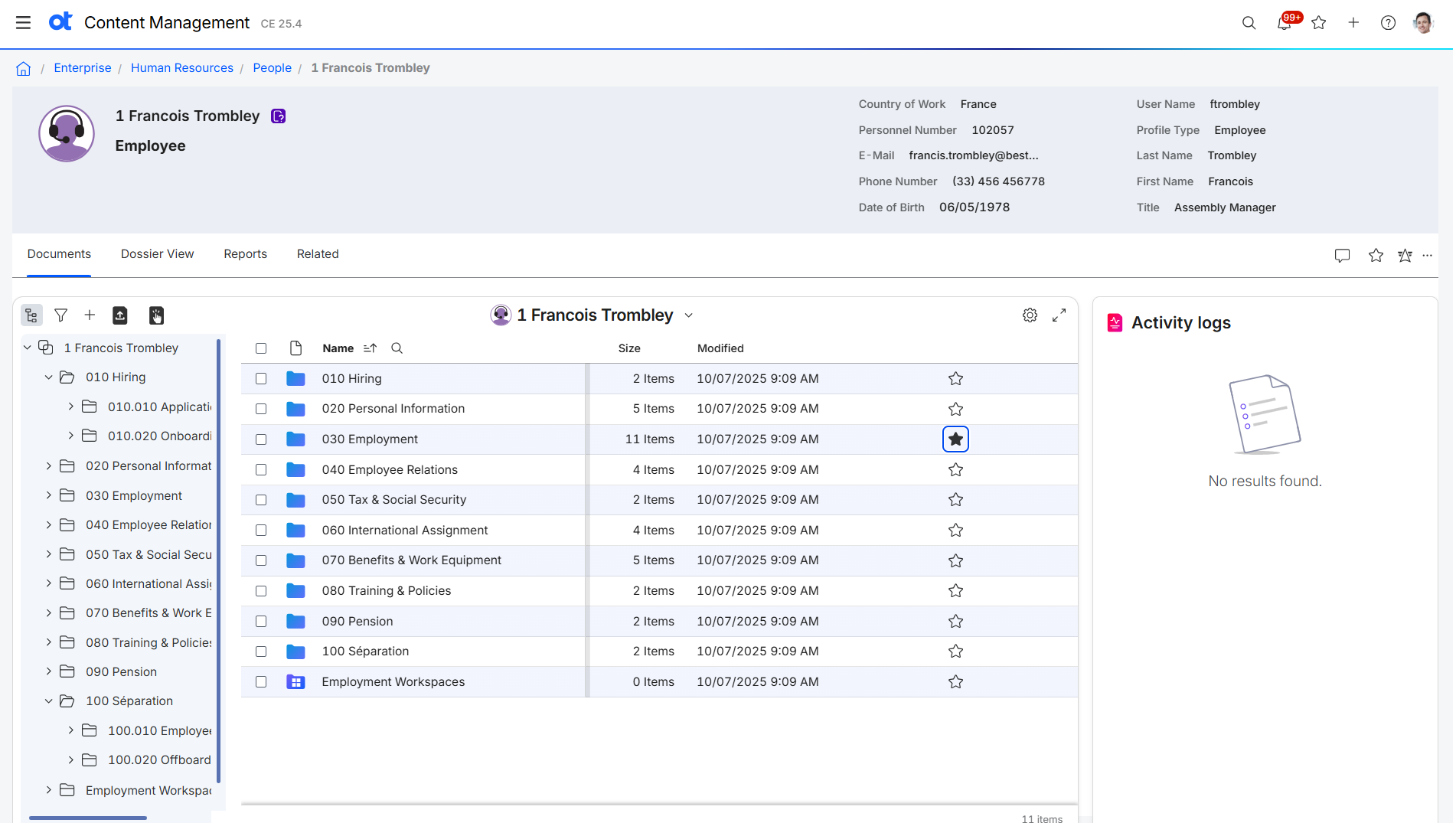
Introducing JATO UX: a clean, modern experience
OpenText Content Management CE 25.4 introduces JATO UX, a completely reimagined user experience that combines a clean, modern design with the flexibility enterprises need to evolve at their own pace.
- Enjoy a refreshed interface built around today’s UX standards: simpler navigation, balanced layouts, and a more intuitive design.
- Personalize your workspace with light and dark modes, one of the most requested user enhancements.
- Seamlessly switch between Smart View and JATO UX, giving teams flexibility to adopt this modern interface at their own pace.
The result is a consistent, visually refined experience that reduces training time, increases user satisfaction, and delivers on the promise of “One OpenText” design.
Microsoft Office desktop co-authoring: real-time collaboration, now generally available
After an experimental preview in CE 25.3, Microsoft Office desktop co-authoring is now fully released and generally available.
- Co-author Word, Excel, and PowerPoint files directly in OpenText Content Management using Office for the Desktop.
- Powered by the Online Editing Service, enabling both online and desktop collaboration in one unified experience.
- Maintain full version control, governance, and audit trails while working in real time with teammates.
Whether using Office for the Web or Office for the Desktop, teams can now collaborate in familiar Microsoft Office environments—combining the flexibility of co-authoring with the governance of OpenText Content Management.
Electronic procurement file for SAP® Public Sector: streamline sourcing and compliance
The new Electronic Procurement File business scenario for SAP Ariba Sourcing and Procurement for Public Sector in SAP S/4HANA® helps public agencies digitize and govern every step of the procurement process.
- Manage the complete procurement lifecycle across SAP and OpenText applications, from requisition to purchase order.
- Centralize all documents, communications, and approvals in a secure, governed workspace.
- Improve transparency, compliance, and audit readiness through automated records management.
By connecting people, content, and process, this pre-deployed business scenario helps public sector organizations modernize procurement while maintaining trust and accountability.
Smarter integrations, simplified governance
CE 25.4 makes everyday work smoother, faster, and more intuitive. Users can now select and copy text directly from documents in Intelligent Viewing, making it easier to extract and reuse information without leaving the workspace. Together with enhanced Microsoft 365 and SAP integrations, stronger accessibility and compliance tools, and the new JATO UX experience, this release delivers meaningful improvements in usability, collaboration, automation, and governance.
To see everything that’s new in CE 25.4, check out the full release notes.
August 2025: What’s new in OpenText Content Management CE 25.3
The CE 25.3 release of OpenText™ Content Management focuses on making every day work faster, more intuitive, and better governed for both users and administrators. From AI-assisted insights to smoother document handling, these updates help organizations save time, stay compliant, and simplify collaboration.
OpenText Content Aviator: smarter answers, richer visuals
OpenText Content Aviator continues to evolve as the embedded AI content assistant inside OpenText Content Management:
- See your data differently. Aviator can now generate charts such as bar, line, and pie directly in the chat panel, turning complex information into quick, clear visuals without leaving the platform.
- Better results with tables. Improved table handling provides more context, producing more accurate answers when your content is structured in rows and columns.
- Choose your AI engine. In addition to GCP and AWS, customers can now deploy Aviator on Azure OpenAI, expanding compliance and regional hosting options.
Together, these advances reduce the friction of finding, interpreting, and presenting information, helping knowledge workers make better decisions in less time.
Quick View in Intelligent Viewing: faster file access
With the new Quick View mode, users can open PDFs, images, and other common file types instantly through client-side rendering. When deeper tools are needed like annotations or comparisons, they can switch seamlessly to the full Intelligent Viewing experience. This two-step model keeps everyday work moving without giving up advanced functionality.
Co-authoring in Microsoft 365: collaborate without compromise
CE 25.3 introduces experimental support for desktop and online co-authoring using the Online Editing Service. Administrators must work with OpenText Support to enable the feature. Once active, teams can edit the same document together inside familiar Microsoft 365 apps while OpenText Content Management maintains full governance, audit trails, and version control.
Mobile uploads with Smart Document Types: compliance from anywhere
For field teams and remote users, the OpenText Content Management mobile app now supports uploading documents with Smart Document Types. This ensures that files added on-the-go inherit the same metadata, classification, and rules as those uploaded in the office, keeping compliance consistent without extra steps.
OpenText Knowledge Discovery integration: automate enrichment
For organizations using OpenText Knowledge Discovery, administrators can now mark collections for automated ingestion. This enables enrichment such as generating summaries, transcribing audio and video, redacting sensitive data, and auto-tagging metadata—all without manual setup. The result: faster content preparation, stronger compliance, and better findability.
CE 25.3 delivers practical enhancements that keep information flowing, whether that means faster views, real-time collaboration, mobile uploads that follow the rules, or AI that works harder behind the scenes. These updates help organizations work smarter, reduce friction, and maintain governance without slowing down.
To see everything that’s new in CE 25.3, check out the full release notes.
April 2025: What’s new in OpenText Content Management CE 25.2
The OpenText™ Content Management CE 25.2 release introduces practical enhancements across user experience, intelligent automation, document control, and integration with enterprise applications. These updates are designed to give administrators more control, improve system performance, and reduce effort in managing content-intensive operations.
Introducing OpenText Content Management for Guidewire
OpenText Content Management for Guidewire delivers seamless content integration for cloud deployments of Guidewire PolicyCenter and ClaimCenter and the documentation that drives insurance operations. By embedding content directly into the Guidewire interface, users can intuitively access and manage documents, correspondence, and case-related information without leaving the system they use every day.
With this solution, insurers gain a single source of truth across business-critical processes—from first notice of loss to final resolution. Claims handlers and underwriters can upload, retrieve, and view documents directly from Guidewire, ensuring every interaction is supported by accurate, current information.
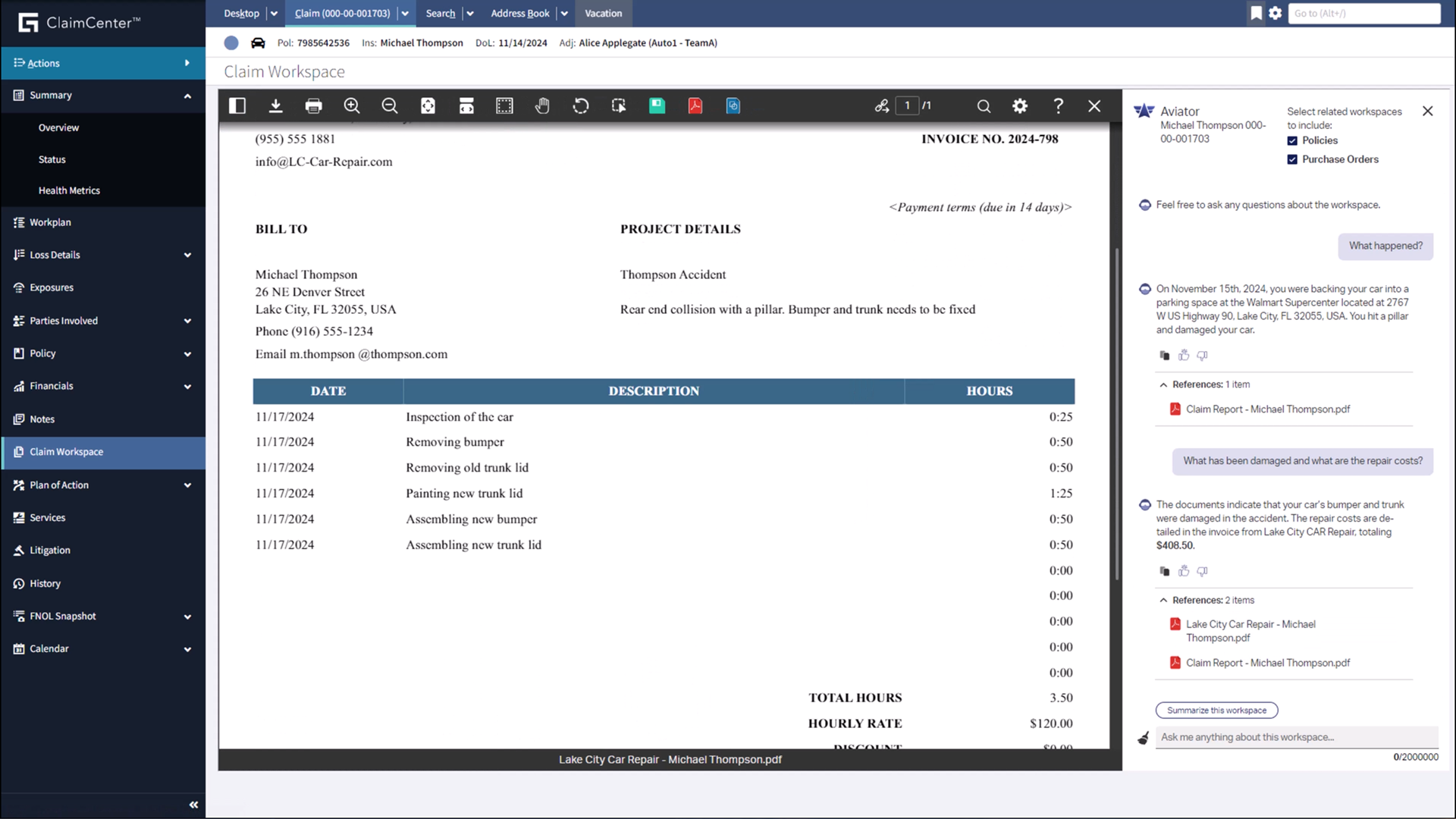
The CE 25.2 release debuts with:
- Real-time data sync between Guidewire and OpenText Content Management, keeping policy and claim information aligned across systems
- Granular roles and permissions to meet regulatory needs, distinguishing access rules between ClaimCenter and PolicyCenter users
- AI-driven insights from OpenText Content Aviator, enabling intelligent summarization of claims, comparison of policies, and automated correspondence generation
- End-to-end lifecycle support, from content capture and case creation to resolution and archiving, ensuring consistent governance and audit readiness
For insurance organizations navigating complex digital transformation and compliance demands, OpenText Content Management for Guidewire simplifies content access, improves collaboration, and enhances the speed and accuracy of every decision.
Document management and user experience
Optimized browse view performance
With the adoption of the V3 REST API, Smart View’s folder navigation is faster and more responsive, eliminating delays when browsing large folder structures.
Boost user engagement with Pendo integration
New in CE 25.2, Pendo integration for private cloud customers allows OpenText to track feature usage, gather in-app feedback, and deliver targeted user guides for both new and foundational capabilities. Administrators or business administrations can opt-in when logging into Smart View or can opt-out via a separate settings page.
Control the experience with smart view admin options
Administrators can now hide unused system actions, import/export customized home pages, and assign a department to a specific home page—helping teams focus on relevant tasks by streamlining their smart view experience.
Mobile and notification enhancements
New mobile app features include inbox view refinements, activity feeds in business workspaces, and user profiles. Notification center settings have also been redesigned for easier configuration.
Streamlined reservations
Clicking a reserved document now prompts users to request reservation access directly, making high-demand document workflows more efficient.
Navigate workflow attachments with less friction
Users can now traverse multi-level workflow attachments using a new sidebar panel—without leaving the workflow context. This enhancement simplifies the review of complex document packages by keeping related content accessible in a single view. By reducing the need to open multiple windows or lose context, this feature helps teams process workflows more efficiently and with greater accuracy.
Business workspaces and smart document types
Enhanced Smart Document Types
New capabilities allow admins to:
- Restrict folders to only store generated documents
- Use smart document types as a data source for custom columns and facets
- Disable document previews during upload to better support privacy preferences
These refinements provide more precision in content classification and access control.
Viewing and transformation
Smarter document conversion and viewing
Intelligent Viewing now allows:
- Viewing renditions directly from the Renditions page
- Viewing multi-document workspaces with a visual progress alert
- Exporting files with annotations by default
- Selecting user groups for viewing rights to simplify gradual rollouts
Folder-level settings can now cascade to child folders, enabling more precise control of watermarking and conversion policies.
Document generation
Self-service font uploads
Admins can now upload fonts directly in Content Manager—no support tickets required.
Increased scalability
Multiple PowerDocs (OTPD) pods now run by default, paving the way for zero-downtime patching and improved performance.
Information governance and protection
Expanded physical records tracking
Users can now view circulation history and bulk process borrow requests from the Circulation tile—making physical record tracking as efficient as digital.
OpenText Content Management for Microsoft 365
Archive connected Microsoft Teams without additional components
With CE 25.2, administrators can now archive Microsoft Teams connected to business workspaces directly from within OpenText Content Management without requiring the integration service add-on. This simplifies deployment and reduces operational overhead by making archiving a native capability. Organizations benefit from more efficient lifecycle management of collaborative spaces, ensuring content remains governed even after team activity ends.
OpenText Content Management with Content Aviator
Now available on AWS
Customers can now choose AWS or GCP for Content Aviator deployment, opening new opportunities for compliance (e.g., FedRAMP) and hybrid environments.
Topic-aware chunking strategy
Content Aviator now uses topic-based document segmentation to improve the accuracy of summaries and answers, delivering better AI-driven insights.
OpenText Content Management with media management
Edit existing annotations
Users can now adjust existing annotations by changing shapes, repositioning markers, or updating comments—making it easier to maintain accurate feedback throughout the content lifecycle.
Add text box annotations directly to video
A new text box tool enables users to overlay comments directly on video frames. This helps reviewers highlight important moments with clear, on-screen labels, improving communication across teams.
OpenText Content Management with document control
Improved document training
Compliance tracking for controlled documents has expanded. Admins can assign trainees and certifiers, enable users to mark documents as read and understood, and generate compliance reports to support audits.
System Administration
Support for zero downtime patching
OpenText Content Management CE 25.2 introduces support for zero-downtime patching, reducing disruption during system maintenance. This advancement addresses a key operational challenge: applying critical security and application updates without requiring extended outages.
Traditionally, patching operations could require maintenance windows of up to eight hours—interrupting user access and business processes. With zero-downtime patching, updates can now be applied while systems remain available, minimizing impact on users and preserving service continuity.
This feature is especially beneficial for cloud operations teams and administrators managing large-scale or always-on environments. By streamlining the patching process, organizations can stay current with updates, improve security posture, and maintain business agility without compromising availability.
Capture and ingestion improvements
The Object Importer now supports:
- S3 storage buckets for data ingestion
- The distributed agent framework
- A dedicated scheduled bot
These enhancements, including improved administration settings and more, improve ingestion performance and flexibility during migrations.
OpenText™ Content Management CE 25.2 delivers practical, high-impact enhancements that help administrators improve system performance, streamline governance, and enable smarter collaboration across the enterprise. From faster navigation and AI-driven insights to zero-downtime operations and deeper application integrations, this release supports a more agile, secure, and connected content environment. As organizations continue to scale and modernize, CE 25.2 provides the tools needed to simplify complexity, enhance the user experience, and ensure content remains a strategic asset.
February 2025: What’s New in OpenText Content Management CE 25.1
The latest release of OpenText™ Content Management CE 25.1 introduces significant enhancements across document management, user experience, enterprise application integration, workflow automation, and security. These updates improve performance, usability, and integration capabilities, helping organizations streamline content processes and drive efficiency.
Document management & user experience
Smart View home pages
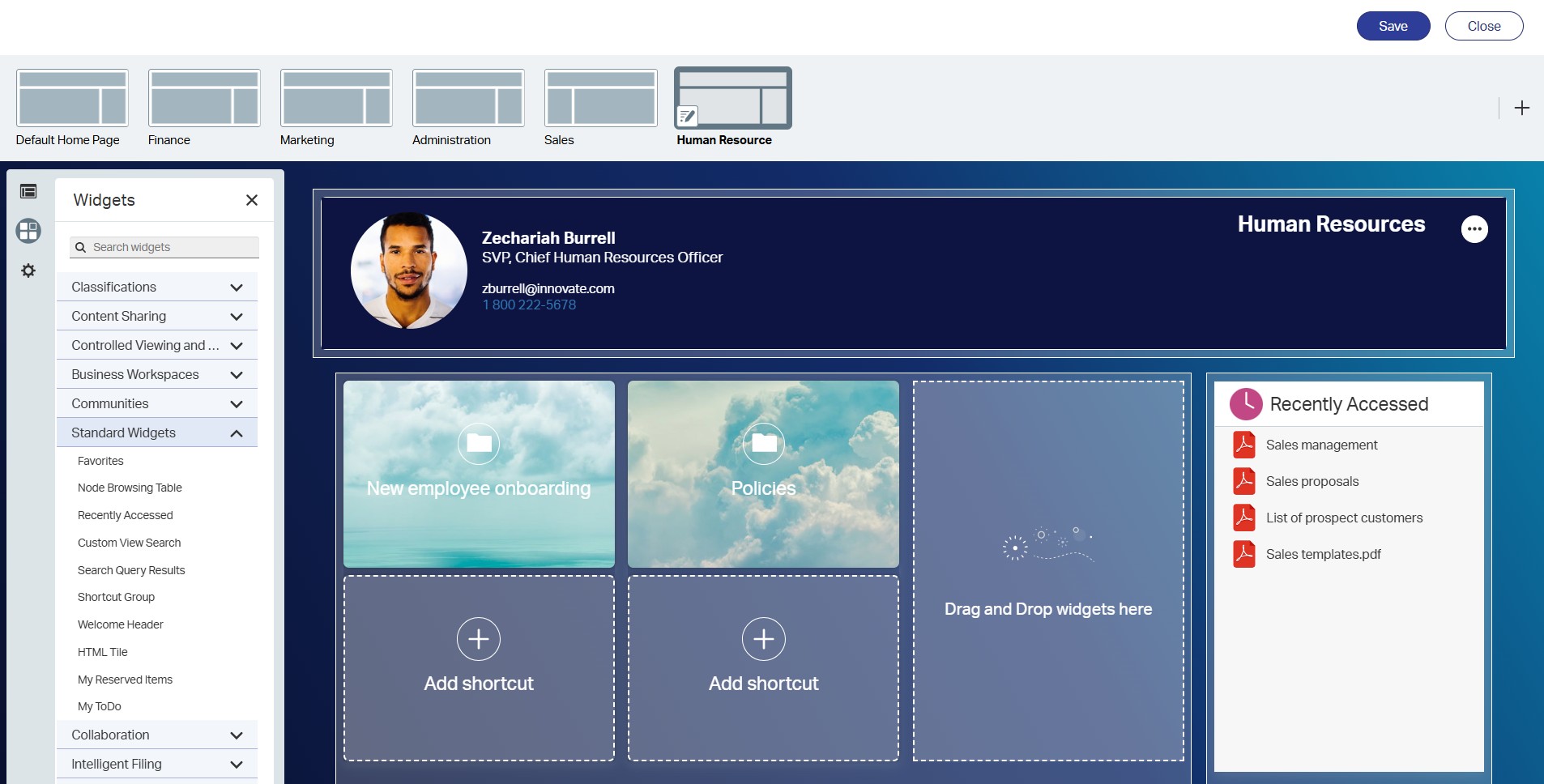
Administrators can create and manage multiple customized home pages within Smart View, assigning them to different departments and configuring advanced rules. Home pages are created and edited using a drag-and-drop style editor within Smart View. End users can then easily switch between multiple home pages via the hamburger menu as well as set a default for a personalized experience.
Optimized multi-selection on search pages
Users can now efficiently select multiple items on search pages, eliminating delays and enhancing productivity when managing large sets of search results.
Simplified access and bulk workflow processing
Users can now act on workflows directly from widgets, processing multiple workflows in a single click. This reduces time spent on manual approvals and increases efficiency.
Business Workspaces & Smart Document Types
Improved performance for opening Business Workspaces
Time to open a Business Workspace has been dramatically reduced for customers running CE 22.1 and later, ensuring faster access to content.
Lock and unlock Business Workspaces
A new event bot automatically locks and unlocks Business Workspaces based on predefined metadata conditions, ensuring data integrity during approval processes. A red lock icon visually indicates when a workspace is locked.
New Smart Document Type bots
- Restrict file formats: Administrators can now enforce MIME type restrictions to ensure only specified document types are uploaded.
- Request document deletion: A new deletion request workflow ensures controlled document removal, requiring approval when configured. See this i
- Resolve missing or outdated documents: Users can now address missing or outdated documents directly from the header widget for faster content updates.
Viewing & transformation
Content Aviator integration with Intelligent Viewing
Users can now interact with Content Aviator directly from the viewer, enabling AI-driven insights while viewing a document.
Bulk document conversion from search results
A new multi-file “Convert” operation allows bulk document transformation directly from search results, improving efficiency and allowing for useful search and export scenarios.
Publication status indicators
Documents in the browse view now display status icons indicating their publication state (e.g., cached, pending, or failed), improving visibility into document readiness.
Banners and watermarks for Business Workspaces
Organizations can now apply screen banners and watermarks from Business Workspace objects, reinforcing security and compliance requirements. Watermarks and banners can now be applied to child objects within the workspace, similar to folders.
Intelligent Viewing installation improvements
A new interactive configuration tool streamlines the Intelligent Viewing installation process, reducing setup complexity. Users that prefer the classic properties file can continue to that text-based method as well.
OpenText™ Content Aviator
Synonyms support
Users can define company-specific synonyms to improve AI understanding of industry-specific terminology, ensuring more accurate responses from OpenText Content Aviator.
Coming soon: AI agentic workflows
OpenText is developing agentic workflows that will break down complex tasks into automated steps, integrating external tools and self-optimizing workflows for greater efficiency.
Document Generation
Document Generation tenant permissions
Permissions for PowerDocs tenants can now be managed using OpenText Directory Services (OTDS) groups, providing enhanced security and separation between business units.
Multiple enclosures support
Users can now upload multiple enclosures at once, reducing manual effort when managing document packages.
Business integrations
Announcing Salesforce Agentforce integration
OpenText Content Aviator for Salesforce Agentforce, integrated with OpenText Content Management in CE 25.1, empowers Sales and Service teams with enhanced actionable insights to boost productivity and accelerate efficiency.
- Discover, summarize and translate content from Business Workspace directly within Agentforce, eliminating the need to switch applications.
- Deliver actionable insights within Agentforce, allowing users to create Salesforce records directly from Aviator content while staying in Salesforce.
- Gain seamless access to relevant content, all within Agentforce.

Outlook add-in improvements
- Users can now create new folders within OpenText Content Management directly from the Outlook web add-in.
- Attachments from OpenText Content Management can be added to emails in compose mode without switching interfaces.
Teams synchronization enhancements
Workspace Team Leads can now manually synchronize workspace members with connected Microsoft Teams environments, ensuring better collaboration management.
SuccessFactors integration improvements
- Onboardee workspaces report: System reports now display the number of onboardee workspaces, providing better visibility into usage.
- Enterprise Scan upload approvals: Documents scanned via Enterprise Scan now adhere to Smart Document Type approval workflows, maintaining content governance.
- Default perspective loading: SuccessFactors permissions are now used by default to calculate perspective loading, reducing system load times.
SAP solutions: authentication enhancements
Administrators can now configure OAuth authentication with additional parameters, increasing security and compatibility with various system landscapes.
Information governance & protection
Physical records circulation management
A new Circulation tile provides tools for borrowing, tracking, and returning physical records, improving governance for organizations managing physical assets. Notification Center now displays messages related to borrowed items.
Dispositioning enhancements
Users can now stop disposition searches and bulk actions mid-process. Additionally, high-volume dispositioning is now a standard feature, improving large-scale record retention management.
Workflow & automation
New internal event triggers
New bots can now react to internal document events, such as new versions or document generation, expanding automation possibilities.
Scheduled bot usability improvements
Enhancements include a refreshed interface, expanded error reporting, and improved tracking of scheduled automation jobs.
Enable/disable JavaObjects in Webreports
JavaObjects can be enabled or disabled along with Oscript on the Manage Global Scripting page, providing an extra layer of security.
Advanced Media Add-On
Private annotations
Users can now mark annotations as private, allowing them to add notes without sharing them with all viewers.
Clipping with annotation data
When creating clips from existing videos, annotation data can now be included, ensuring critical insights remain with the content.
OpenText Content Management CE 25.1 introduces powerful enhancements that improve usability, performance, and automation. From Smart View optimizations and AI-driven workflows to advanced governance and security features, this release supports organizations in managing their content more effectively. These updates ensure businesses can navigate the evolving demands of enterprise content management with greater efficiency and flexibility.
October 2024: What’s New in OpenText Content Management CE 24.4
Announcing Protected B Certification
The Canadian government’s Protected B certification provides stringent security assurance for cloud services used by federal agencies, ensuring sensitive data is protected against cyber threats. This certification level, applicable when compromised information could cause serious harm, is crucial for agencies managing sensitive data and records. OpenText now offers Protected B-certified cloud solutions, meeting high standards for security and compliance in government information management. OpenText’s solutions empower agencies to securely manage public sector records, streamline processes, and facilitate inter-agency collaboration while adhering to government standards for electronic records and document management.
Protected B certification is valuable for government agencies seeking enhanced security, streamlined procurement, and compliance assurance. By standardizing security requirements, this certification simplifies the process for agencies procuring cloud services, reducing both cost and redundancy. With certified solutions like OpenText Content Management for Government, agencies can digitize records, improve operational efficiency, and enhance citizen service, all while maintaining compliance with federal regulations. OpenText’s commitment to secure information management helps agencies meet their goals responsibly and efficiently, optimizing resources while safeguarding sensitive data.
In addition to Protected B certification, the release of OpenText Content Management CE 24.4 brings streamlined navigation, powerful integrations, and advanced automation capabilities. These updates improve information accessibility, operational efficiency, and compliance with industry regulations. Here’s just some of the highlights from this release.
Enhanced navigation with Smart View hamburger menu
The introduction of a “hamburger menu” in Smart View offers users a streamlined navigation experience. This menu, embedded in the application header, provides quick access to frequently used areas like “My ToDo” and “Recently Accessed,” optimizing workflows and improving ease of use. It can be enabled or disabled via an admin setting.
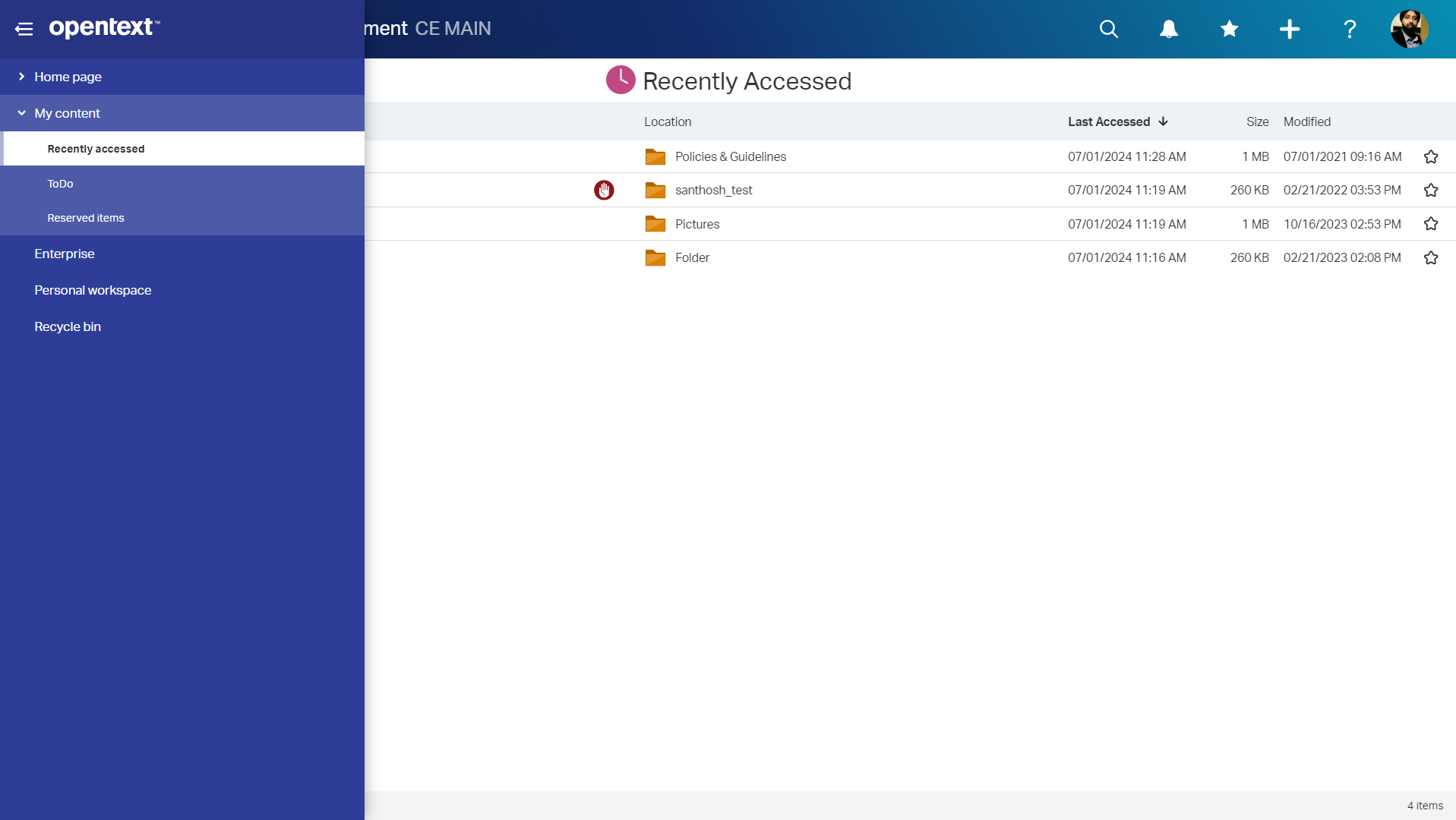
Intelligent viewing – eye icon updates
The viewing and transformation options in Smart View have been refined, with the “eye” icon updated to include Intelligent Viewing as a submenu item. The eye icon is also now used for other open commands such as the Office integration. This change frees up screen and menu space, making navigation more intuitive for administrators.
Simplified business workspace members management
Business Workspaces in Smart View have been enhanced with streamlined participant management. Users can now manage roles and folder access directly from the side panel, making collaboration setup faster and reducing time spent on administrative tasks.
New business scenario: Customer service
A new Customer Service business scenario has been added to the Business Process Library. Integrated with Salesforce, this scenario supports knowledge base article creation and updates with pre-configured event bots, workflows and WebReports.
Multiple signature types for DocuSign
CE 24.4 introduces multiple signing methods within DocuSign, including support for qualified electronic signatures. Additional metadata can also now be passed to DocuSign. This added flexibility is ideal for organizations needing to meet specific regulatory requirements for contracts and other critical documents.
Search multiple workspaces and documents with Content Aviator
Users can now select multiple workspaces as well as multiple documents when triggering Content Aviator. Workspaces and documents can be selected from anywhere including the browsing view, search results, within a collection and more, as long as they are Content Aviator enabled.
Automatically create a connected Microsoft Team
When creating a new Business Workspace in OpenText Content Management, users can now automatically generate a connected Team. This automated creation simplifies content sharing, enhancing collaboration for users who rely heavily on Microsoft Teams.
Support for inactive employee workspaces in SuccessFactors
The latest update allows automatic removal of SuccessFactors role members from a workspace when employee status changes from active to inactive. Additionally, re-hire scenarios are supported (inactive to active), optimizing synchronization jobs and improving performance for organizations with high employee turnover, such as seasonal operations.
Enhanced high-volume records management metadata performance
Administrators managing large data volumes can now utilize Records Management Metadata Bulk Update Rules, a feature that simplifies high-volume metadata adjustments. This update is particularly useful for organizations needing frequent reclassification or retention changes.
Advanced media add-on enhanced video player and audio support
Advanced Media Add-On now includes an enhanced video player with additional playback controls including zoom, playback speed adjustments, and options to skip forward or back 30 seconds. In addition, audio support has been added allowing users to convert, stream, annotate and clip audio files just like video files.
With these updates, OpenText Content Management CE 24.4 reinforces its commitment to delivering robust, flexible, and user-friendly solutions. By focusing on integration, automation, and improved user experiences, this release equips organizations to navigate the evolving demands of enterprise document management.
July 2024: What’s New in OpenText Extended ECM CE 24.3
The latest release of OpenText Extended ECM CE 24.3 introduces a suite of new features aimed at enhancing the user experience, improving productivity, and ensuring seamless integration with other tools and platforms. Here’s a look at what’s new:
Advanced Media Add-On

New in CE 24.3, Advanced Media Add-On provides a first-class experience for users interacting with video content as part of business processes. This add-on allows users to:
- Streamline video conversion and streaming.
- Deliver high-quality video streaming at scale.
- Enhance collaboration with annotation tools.
- Simplify sharing with quick and easy clip creation.
For more on Advanced Media Add-On, read the blog.
Content Aviator – Improved document & workspace summaries
The latest update to Content Aviator enhances document and workspace summaries. By upgrading from Google PaLM 2 to Gemini, users receive more accurate and useful answers. The summaries now include a short paragraph followed by a bulleted list of key points, making it easier to sift through large volumes of content.
New sales business scenario
Manage the entire sales process from campaign to lead to opportunity to sales order with the new sales business scenario in conjunction with Salesforce. This feature includes records management, Smart Document Types, and more as part of the business process library.
Microsoft Teams – Folder tab in each channel
Extended ECM now keeps users focused on relevant content within specific Teams channels. Each channel connected to a business workspace will have a folder tab pointing to the mapped folder in the business workspace, ensuring easy access to the right content.
Outlook Web Add-In – Bulk email filing
Increase productivity and improve the user experience by eliminating the need to file multiple emails individually. The new bulk email selection and filing feature in the Outlook Web Add-In streamlines the process, allowing users to file multiple emails into Extended ECM more efficiently.
“My ToDo” widget
The new “My ToDo” widget provides users with a singular view of all their assignments, enabling them to quickly take action and push business processes forward. Default sections include:
- My Workflows
- My Reminders
- My Stateflows
Users can also provision custom tabs to track specific workflows of interest. Admins can switch the end user task widget between the legacy “My Assignments” and the new “My ToDo”.
“My Shares” widget – New folders added
For users who regularly share content outside their organization, the “My Shares” widget now provides a holistic view of shares and their status. New sections include:
- Approval Required: Displays shares requiring manager approval.
- Shares Expiring Soon: Shows shares nearing expiration, with admin control over the notification period.
Smart Document Types – “Upload with Approval” bot
Ensure the quality of content added to a workspace by requiring approval before uploading certain document types. Users can choose a document type, which then gets sent via workflow to an approver for review before being added to the workspace. Default workflows are provided, or users can build custom approval processes.
Electronic Signatures – Multiple “Meaning of Signing”
When signing a workflow, users can now select from a list for “Meaning of Signing,” allowing for better definition and understanding of the approval process. Business process designers can assign different meanings to each signing step, centralizing configuration for all signatory steps.
Viewing & Transformation – View Only mode for deep links
Enhance security and governance with the new View Only mode for deep links, available at the content or folder level. Users that open deep links in view-only mode will not have the ability to add annotations, print, or save.
Switch between vertically & horizontally aligned metadata fields
The new “Label Alignment” setting under Configure Smart View allows admins to choose between vertically or horizontally aligned metadata fields. This provides better accessibility and responsiveness, adapting to various screen layouts and user preferences.
Records Management – Classification rules for perspectives
Reduce administrative work by configuring a single Perspective for all objects of a given classification. Use a rule to display a Perspective for multiple containers based on a standard classification, streamlining management and updates across Extended ECM.
Records Management – Make confidential
Restrict access to sensitive content with the new “Make Confidential” feature, temporarily removing permissions for all users except the owner and the user performing the action. Admins can control and restrict usage of this feature.
WebReports – Generate Microsoft XML documents
Easily convert documents to .docx format for security requirements. Users can generate MS Word XML .docx files from various sources, including LiveReports, search queries, Content Server files, and external applications. This feature can be scheduled or triggered by specific events.
WebReports – “Run as”
Enhance flexibility and security control by allowing business admins to run reports on backend operations without modifying permissions. The new “Run as” option under Properties lets users select from a dropdown or run as a WebReports System User, with audit trails showing the “Run As” user.
Additional enhancements
- Tenant Administrator user type: A new user type for cloud customers that allows access only to administration pages and specific volumes, ensuring segregation of duties without content access.
- SAP SuccessFactors integration: Business admins can link to candidate workspaces or start document generation from external applications, extending functionality into SuccessFactors Recruiting or Workzone.
April 2024: What’s new in OpenText Extended ECM CE 24.2
The Extended ECM CE 24.2 release includes new capabilities designed to help organizations master modern work.
Streamline communication with precise linking
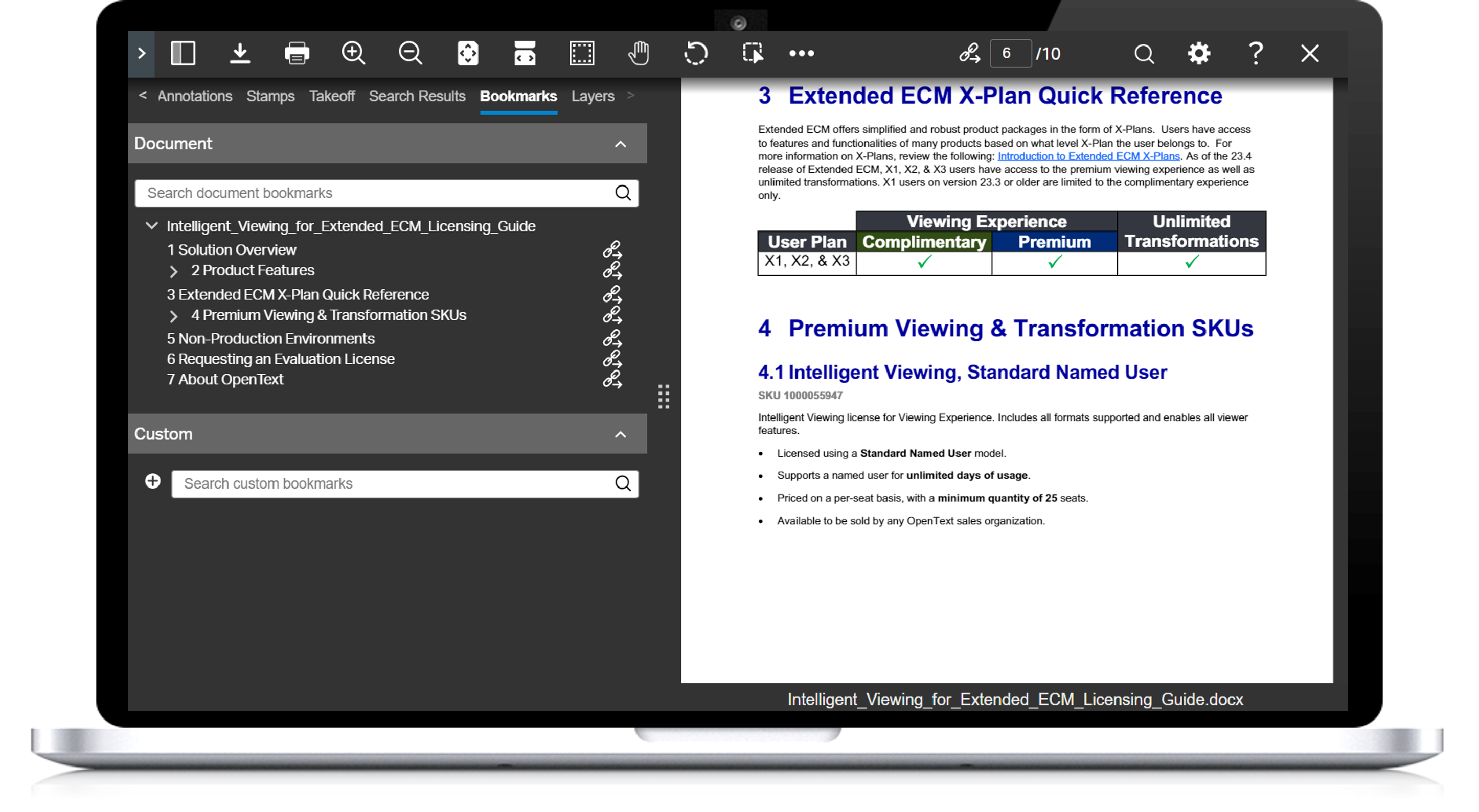
Extended ECM now empowers users with the ability to create a URL that will open a document and navigate to a designated section of that document. The capability facilitates collaboration with the ability to precisely point to a specific bookmark, page number, or search term. As an additional security measure, “deep link” URLs can be sent with a “view only” designation.
Clearly communicate about new document versions
Users adding a new version of a document are now able to easily communicate information about that version. Once the new version is uploaded, a dialogue box pops up to prompt the user to describe why a new version was needed or what changed. Users can also quickly see all added descriptions in a single view of the versions table.
Improve efficiency with new features for working with Extended ECM teams
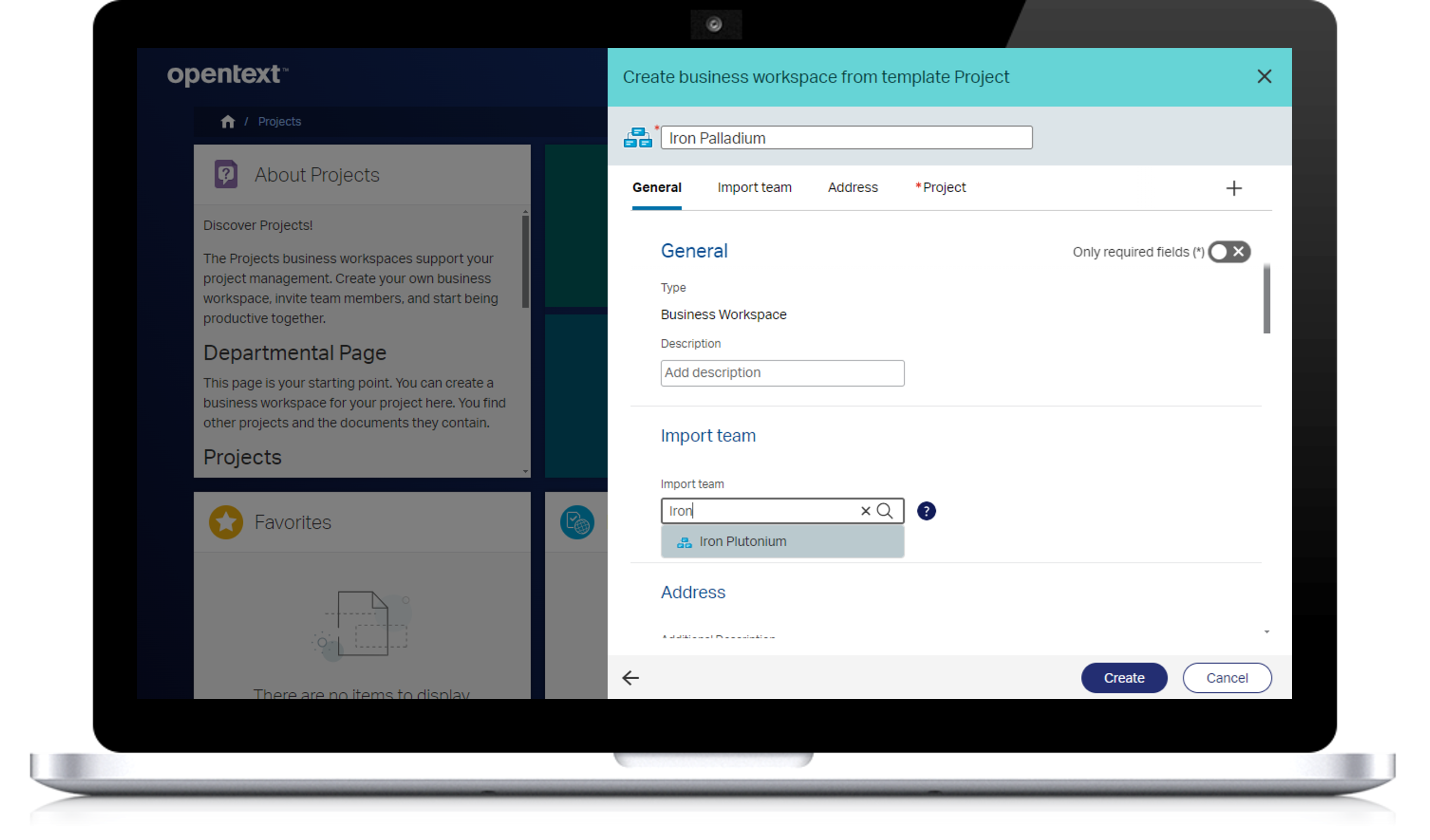
A couple of new features improve the way team leads work with their teams:
View team members at a glance – Quickly display team participants, grouped by their roles, by with a single click that opens a searchable side panel.
Easily import existing teams into new Business Workspaces – When creating new Business Workspaces, streamline the process and cut back on manual work with the ability to automatically import a team from a previous business workspace of the same workspace type.
Enhance productivity and compliance with Smart Document Types
In addition to using the File Upload widget, users can now easily drag and drop or click to add a document for Smart Document Types. Using Smart Document Types empowers users to streamline work by automating content storage, metadata usage, and follow-up processes.
Tighter integration and usability between Microsoft Office 365 and Extended ECM
- Users will be auto notified, via push notifications to Microsoft Teams, of important items relevant to their role.
- Users can strengthen the archiving process with the option to delete a Team upon retirement to ensure there are no other copies except the archived copy.
- An enhanced Outlook web add-in for Extended ECM will support email filling to any permissible folder
- Users have the option to create Teams channels as private or shared for sync mapping
Additional innovations to help you master modern work
- Business administrators at organizations that have implemented OpenText™ Content Aviator can now enable Aviator by workspace type, reducing manual efforts when enabling a large number of workspaces.
- Extended ECM mobile app users now have the added convenience of being able to create Business Workspaces from within the app.
- A new feature for end users who want to work with metadata for reporting enables them to export search results directly from Smart View into CSV or JSON formats, maintaining their selected columns. Permissions and security clearance levels are also maintained within the export results.
January 2024: What’s new in OpenText Extended ECM CE 24.1
The Extended ECM CE 24.1 release includes new capabilities designed to help organizations master modern work.
Content Aviator surfaces your most important information in Extended ECM
With the introduction of OpenText™ Content Aviator, users can leverage the power of generative AI and large language models (LLM) for conversational searches that help them find what they need – faster.
Content Aviator provides generative AI content management and acts as an intelligent assistant that users can ask conversational questions, receiving answers that distill large volumes of Extended ECM content into comprehensible summaries, based on a user’s permissions. Once a question is answered, users can choose to ask follow-up questions or start new searches from scratch. Users can even ask Content Aviator to summarize a Business Workspace with the click of a button.
For more information about Content Aviator, read our recent blog post, “Transform user productivity with an AI-powered intelligent assistant.”
Streamline processes with easy-to-use document-centric automation
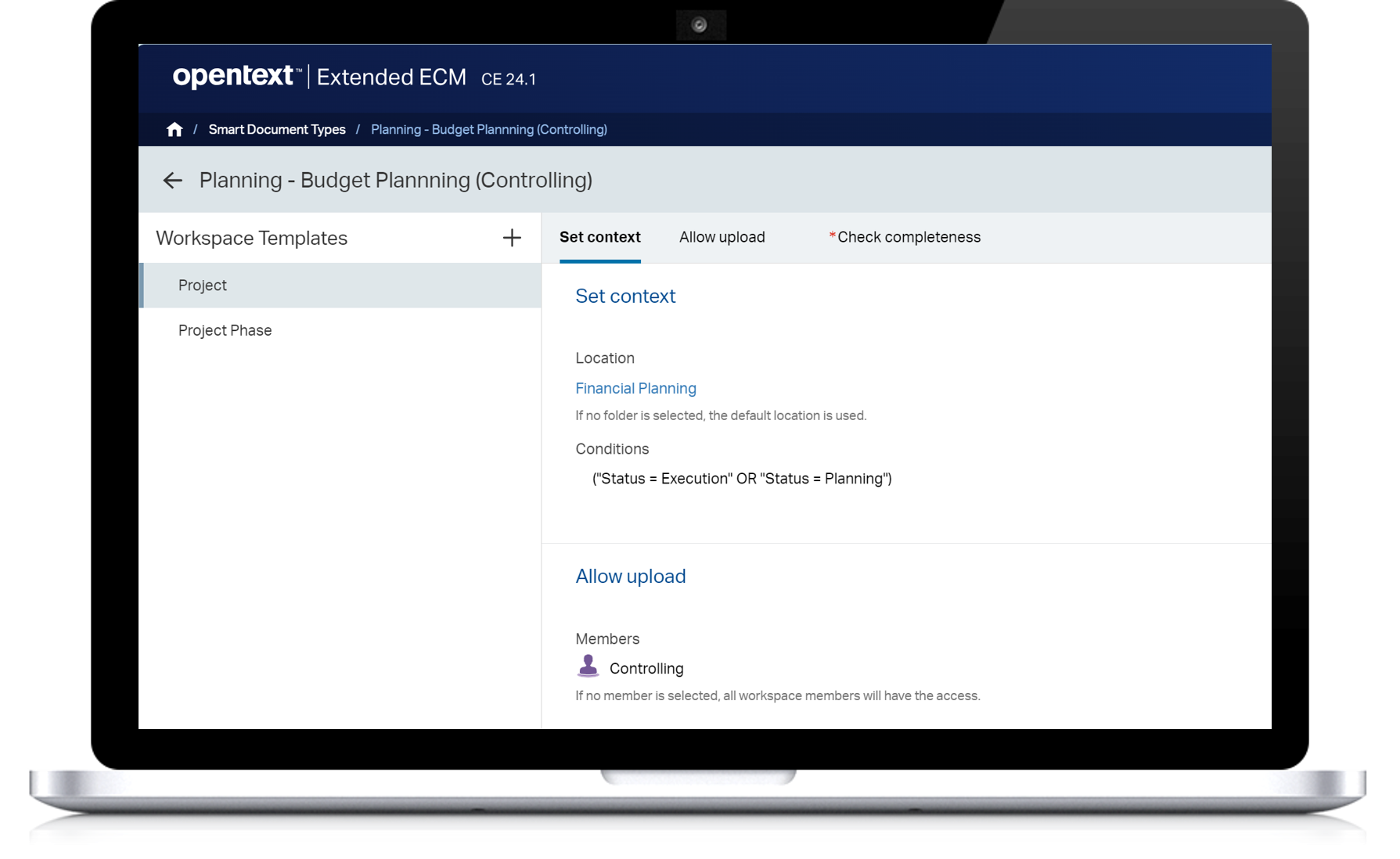
Administrators can easily configure what happens with uploaded documents using bots to configure Smart Document Types—without the need for complex coding. Smart Document Types help store content correctly, ensure the appropriate metadata is included and can trigger follow-up processes.
With the new flexible, scalable functionality, administrators use simple bots to quickly configure conditions based on categories, attributes, operators and values. Multiple parameter blocks can be applied for more complex scenarios.
Personalize your user experience with options to show, hide and reorder columns
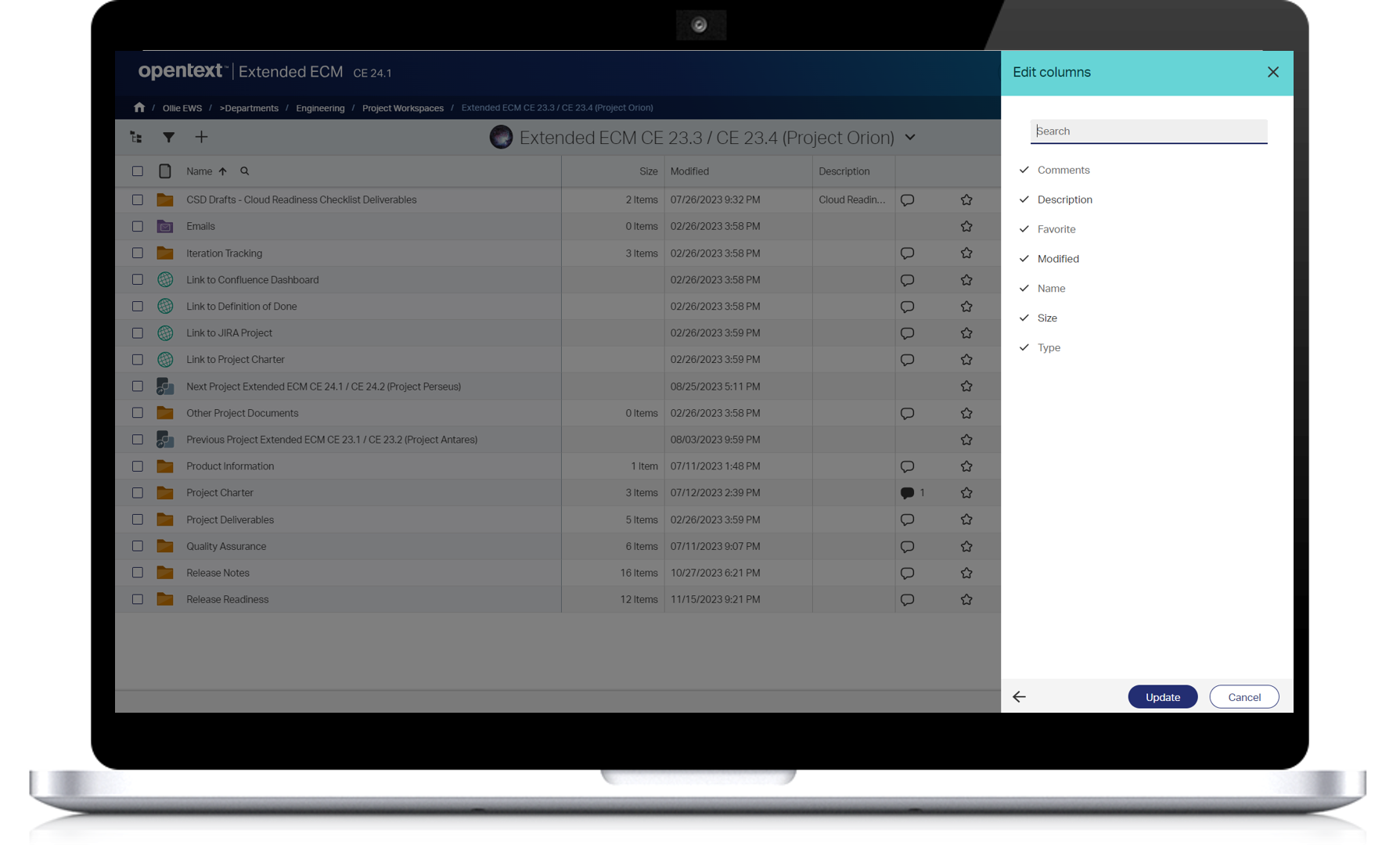
Extended ECM empowers end users with the ability to personalize and improve their experience by choosing how to display columns for their individual work preferences.
By simply opening the Column Settings panel, users can choose to select or deselect checkboxes for each column. They can also drag and drop to reorder columns. This view is available throughout the product and for every user—and the customized settings are “remembered” for both browse views and search results views—so the same column order is shown each time a user logs in.
Maximize database storage with improved viewing cache management
Admins can perform new cache operations to optimize available database storage and improve re-processing and troubleshooting of content—choosing to either clear the viewing cache on demand or setting a timeline to automatically clear the cache of anything that has been viewed.
Easily navigate to Business Workspaces from SAP
Two new features empower users with the ability to easily work with Business Workspaces in SAP S/4HANA:
- By selecting a line item (such as purchase contract, sales contract, task list, etc.), users can click through to an associated Business Workspace.
- Admins can now easily configure a Business Workspace in an SAP Fiori app with key user adaptation—without the need for complex coding.
Improve efficiencies between Microsoft Teams and Extended ECM
There are two new ways to boost productivity between Extended ECM and Microsoft Teams:
- Administrators can choose a configured Microsoft Teams Template whenusing the Extended ECM Microsoft Teams job scheduler to automatically create Teams for Business Workspaces. This provides more flexibility and the ability to create and use Teams templates that meet the demands of their organizations.
- Using the Teams app, end users have an option to choose a Microsoft Teams Template when simultaneously creating a Team and a Business Workspace.
Stay apprised on system health
A new System Health test framework allows Administrators to quickly test various aspects of Extended ECM, including: Document Management, OpenText Directory Service, Search, and System. The new testing capabilities will help provide Administrators with a more complete picture of system health over time.
November 2023: What’s new in OpenText Extended ECM CE 23.4
The Extended ECM CE 23.4 release includes new capabilities designed to help organizations master modern work.
Simplify complex procurement operations with the Procurement Business Scenario
Business Scenarios are turnkey, pre-deployed line-of-business solutions that can be “turned on” at no additional cost.
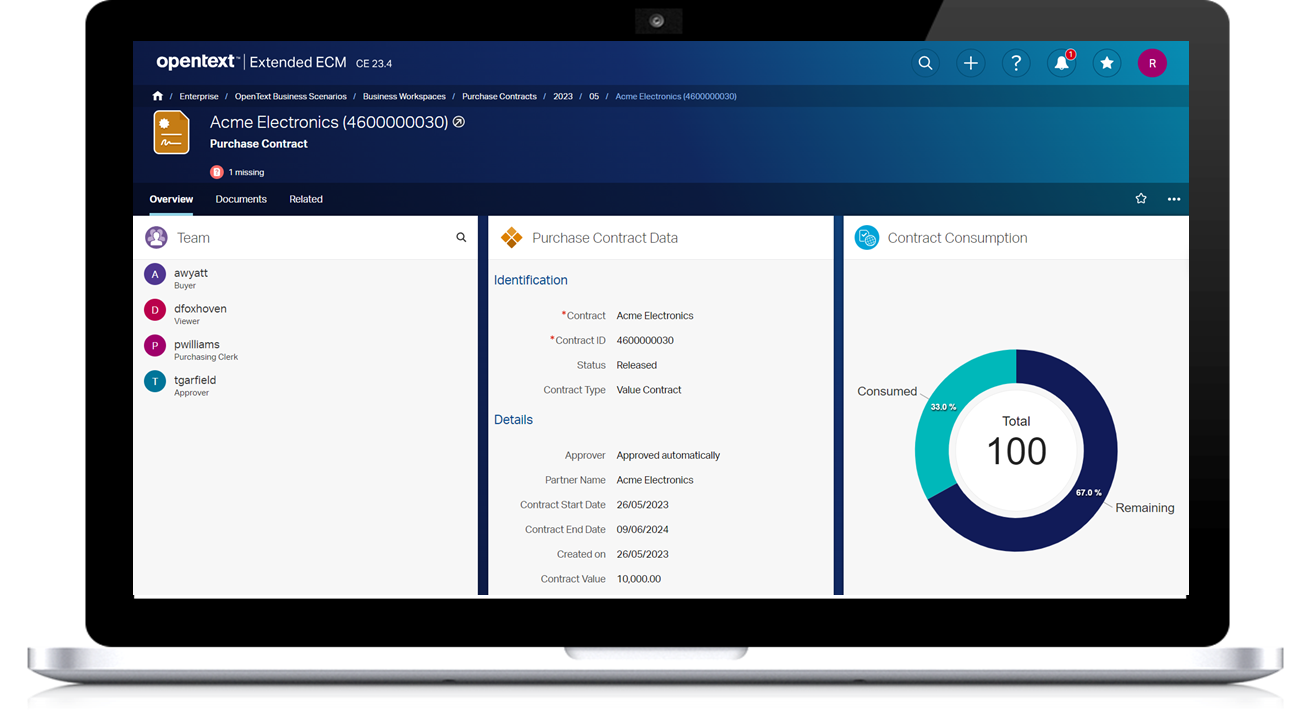
Manage content related to your procurement processes in Business Workspaces, with the ability to work as a standalone solution (supported by workflows) or driven by processes in SAP S/4HANA. The Procurement Business Scenario makes it easier to:
- Create a purchase requisition from any user’s landing page
- Manage all procurement information from purchase requisition to purchase order
- Keep track of procurement updates on an at-a-glance dashboard
- View contract consumption on the workspace
This Business Scenario is designed to work independently supported by workflows or with SAP S/4HANA for more complex processes, including approval workflows. (A new Extended ECM Business Scenarios User Guide is also available for customers (login required) for information about the general structure of Business Scenarios, which Scenarios are available and how to deploy them.)
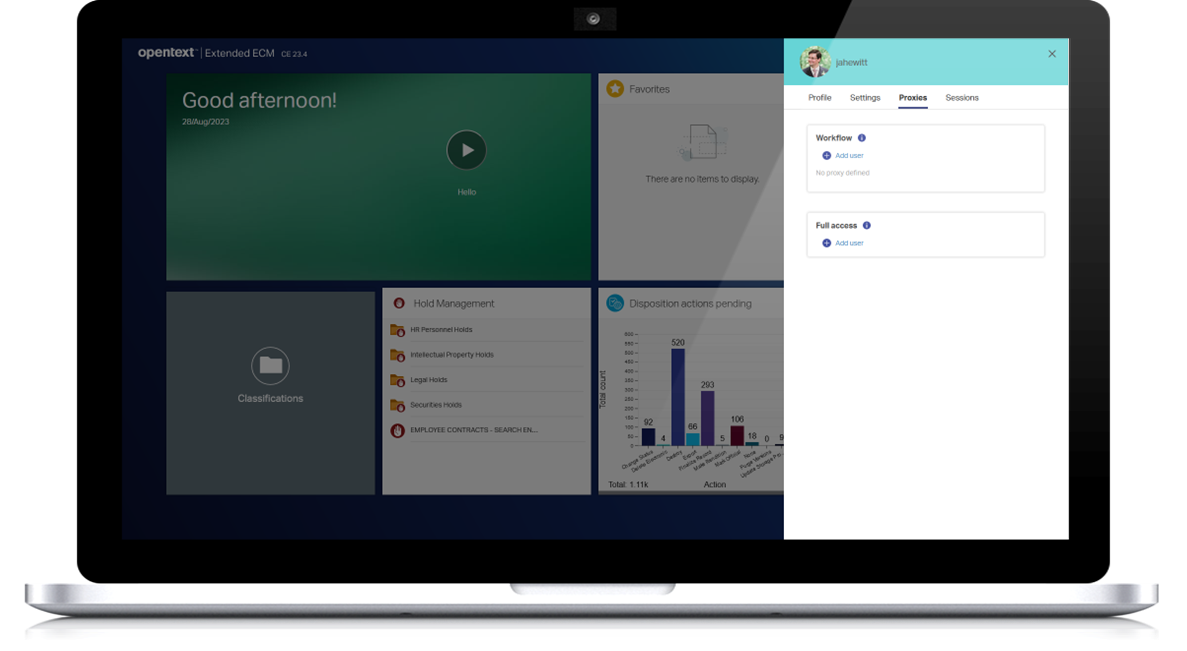
To keep projects moving, delegate a proxy to cover for a specific user
Extended ECM users can assign a proxy who can act as though they are that user—for coverage during vacations and other situations that arise. Delegate a proxy indefinitely or for a specific start and end time window, allowing for advanced scheduling if an absence is planned. For additional clarity, the assigning user is alerted in the Notification Center every time the proxy user is working as them and a visual banner is displayed for the proxy user noting that they are “working as” the other person. Administrators also have the ability to set and change proxies on behalf of other users.
Quickly address Intelligent Viewing needs
Release CE 23.4 featured several new Intelligent Viewing features:
- Support the secure viewing of content with Azure Information Protection (AIP) – “View Only” functionality allows AIP content to be viewed but not published, printed or annotated and restricts further processing with manual or automatic conversion features.
- Support for work with Apache OpenOffice Formats – Viewing, annotation, redaction, publishing, and transformation are now supported when working with OpenOffice formats including ODT (text documents), ODS (spreadsheet), and ODP (presentation programs) file formats.
A better, more personalized way to work with columns
Release CE 23.4 provides more ways to personalize a user’s view that is maintained whenever the user logs in from the same laptop and browser:
- Browse view – Users can now manually resize columns and scroll horizontally when more columns are available. The manual settings persist for the user’s future work for a personalized browse view experience.
- Search view – A new gear icon allows users to switch between views that include tabular search, standard search, and a brand new pinned columns search. With pinned columns, users can set or “pin” a column in place with horizontal scrolling enabled for the remaining columns.
New notifications to keep users informed
Release CE 23.4 featured several new notifications for content sharing:
- Share approval – Share coordinators or share administrators who want more control over the content that gets shared with Core Share or Microsoft Teams can now opt-in to receive notifications for shares that require their approval. When an employee tries to add a document to a shared folder, the Notification Center will provide an alert that approval is needed for a document that has been added to a shared folder.
- Share Error and Share Expiry – Share coordinators and share administrators can opt-in to be alerted in the Notification Center (vs. via email) for shares with errors or shares that are set to expire in a pre-specified number of days.
August 2023: What’s new in OpentText Extended ECM CE 23.3
The Extended ECM 23.3 release includes new capabilities designed to help organizations master modern work.
Streamline document availability with Reservation Management
Extended ECM SmartView users who have gone to edit a document, only to discover that someone else has it reserved, will appreciate the new Reservation Management feature.
Collaborators can now choose to “request a reservation” on documents that are currently in use, reducing the need to leave the platform to send an email or instant message to notify team members they are waiting. This will help minimize downtime and remove bottlenecks by (1) communicating that a user is waiting for a document and (2) letting that user know when the document is available for them to reserve. This allows users to focus on other projects while waiting for their notifications, and it will be particularly useful for highly collaborative teams that are working with many files—particularly those that aren’t supported by Microsoft Office online or other co-authoring tools.

Automate transformation with a Workflow Module step
A new Workflow Module step for transformation enhances content review and collaboration. Easily convert content to highly accessible PDF/TIFF formats as an Extended ECM workflow step that includes the option to apply annotations, redactions, banners and watermarks before publishing as a new document version or rendition.
Provide clearer at-a-glance information for more productive collaboration
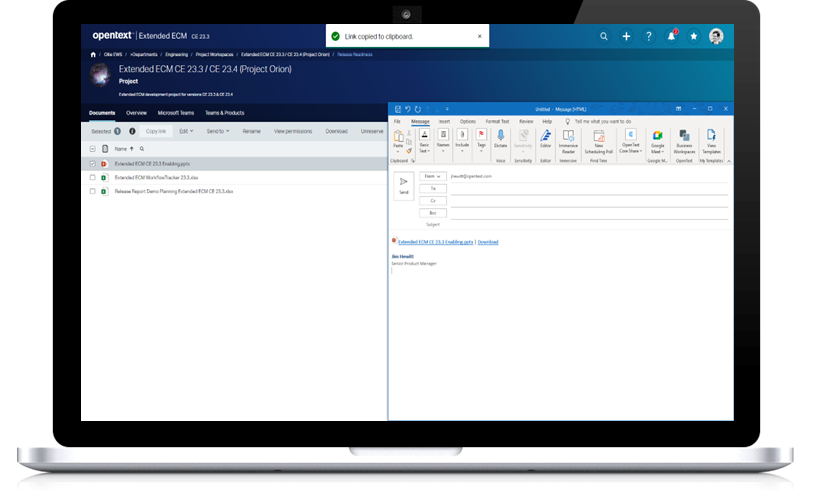
To provide a better user experience for anyone who collaborates through email and Teams, enhanced copy URLs will provide more information at a glance—including icons, document names and a direct download link—so collaborators better understand where a link will lead them before they click on it.
Easily add charts to WebReports using no-code templates
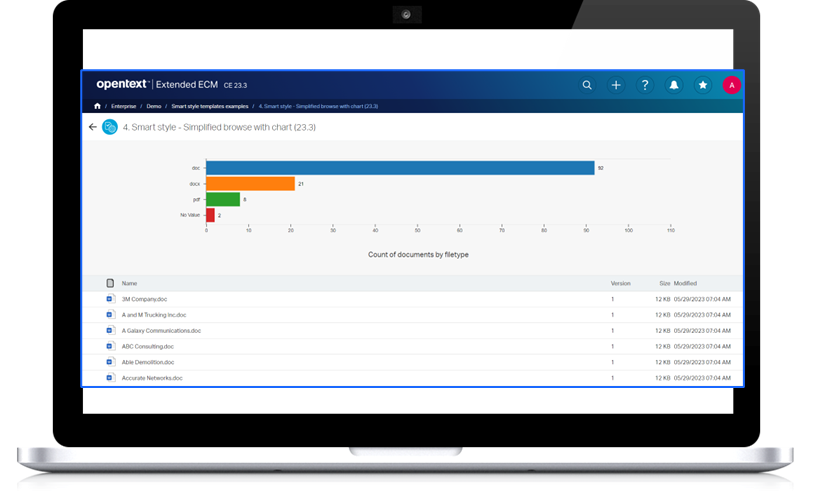
Two new WebReport Smart Style templates featuring charts are now available. Without the need for coding, users can now either (1) display a clickable Visual Count Chart or (2) create a report featuring the chart along with a browsable list of the items below, which can be customized with actions such as copying items, viewing properties or copying links.
Columns, categories and attributes can also be easily added without taking up developing time. In addition to the new reports, other Smart Style reports include Simplified Browse, Simplified Metadata and Simplified Table and Visual Count Chart.
June 2023: What’s new in OpenText Extended ECM CE 23.2
The Extended ECM CE 23.2 release includes new capabilities designed to help organizations master modern work.
Amplify OpenText Extended ECM (or OpenText Documentum) with AI-powered insights
OpenText Knowledge Discovery, a market-leading knowledge discovery and analytics platform, can now be combined with Extended ECM or Documentum to uncover the rich knowledge and connections hidden in your content. Adding Knowledge Discovert, which supports over 1,000 data formats, enables users to surface key insights stored deep within unstructured data (within repositories such as Extended ECM, Documentum, Microsoft® Teams or SharePoint and other file shares). For more information, read the blog post: “Work smarter with content insights.”

Stay on brand and under budget
New streamlined branding functionality reduces both the need and extra cost of custom development to align with your organization’s preferred branding. Business administrators can now add a brand logo, background color theme, breadcrumb font color and/or icon color theme directly from within Extended ECM Smart View. The intuitive WYSIWYG (What You See Is What You Get) editor means changes are previewed before you hit save and can be made with just a few quick clicks. The new branding is implemented within seconds—and admins can revert to the original default settings just as quickly and easily.
Quickly address transformation needs
Release CE 23.2 featured several new Intelligent Viewing features:
- Improved efficiency of content transformation – Automatically convert content within a Business Workspace. This container-level conversion can be configured so content that is added is automatically converted from the current format to the universally used PDF/TIFF formats and published to a targeted directory. Additional options include applying banners or watermarks and/or deleting source documents once a conversion task is completed. New functionality is also now available at the folder level: Automatic conversion can be triggered when a new version of a document is added to a configured folder—particularly useful for document revisions or updated drafts of engineering drawings.
- Create rendition objects – Create Extended ECM renditions as an output option via automatic conversion, manual transformation and publishing from within the Viewer. The content converted as a rendition maintains a relationship link to the source document version they are created from.
- Work more effectively with compound documents – The Compound Document object type is now supported for initiating an at-a-glance multi-file view, automatic conversions and secure banners and watermarks.
Do more with your SAP Integration
The CE 23.2 release featured key enhancements for authentication and productivity within SAP integrations:
- Support for SAP IAS/IPS for authentication purposes – For customers that use multiple SAP solutions, Extended ECM supports SuccessFactors tenants that have SAP Identity Authentication Service (IAS) or Identity Provisioning Service (IPS) enabled for authentication and provisioning.
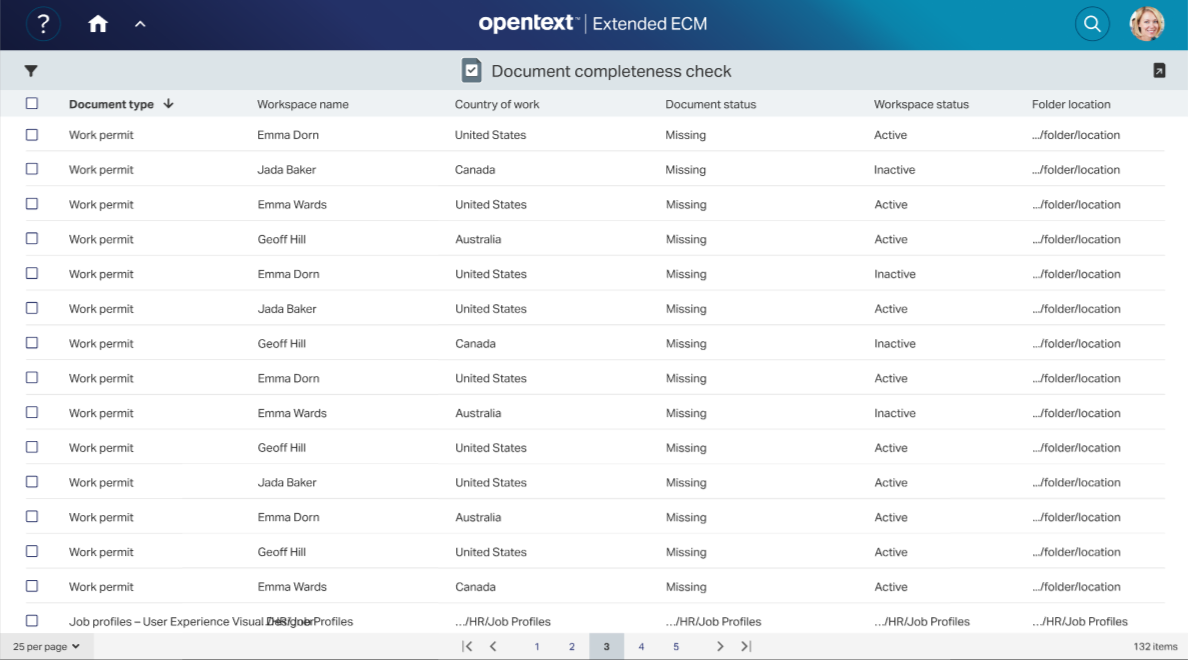
- Review file completeness at a glance – In addition to monitoring single workspaces, managers and HR administrators are now able to save time by quickly seeing if documentation is missing or outdated over several workspaces—such as across teams or even an entire organization. A new widget enables users to jump into a view of an aggregated document completeness report with the ability to choose whether to display 30, 50 or 100 items per page. For a more precise view, use filters by document type, country of work, document status and workspace status. The report updates immediately, based on the options you select.
Improve information governance with retention schedules
Users can better manage the lifecycle of their records. The Record Series Identifier (RSI) retention schedule, which defines the stages of a record and the conditions that move the record to the next stage in its lifecycle, is now available in Smart View. Capabilities include adding stages, editing stages, deleting stages, and approving and viewing approval history.
Additional features for operational efficiency
- Enterprise Connect users can now press a handy “Copy Link” button in the “My Working Document List” to copy the link to the Smart View of a document in the Office Editor cache with ease.
- The Intelligent Filing Analysis Tool, used for the creation of analysis and runtime profiles for Intelligent Filing functionality, can now be accessed in the OpenText Cloud—with no more need to download it locally.
- Controlled viewing and printing and electronic signatures are now fully cloud-ready for quick configuration by Business Administrators.
Accelerate the enterprise content journey with agile and scalable tiered plans
Whether your goals are to boost team productivity, build cross-functional excellence or bridge across boundaries, the new Extended ECM X-Plans have a cloud or license plans to suit your needs. The plans were built to fast-track deployment and accelerate time-to-value at every phase of your modernization journey—all with the scalability to grow as your business grows.
November 2022: What’s new in OpenText Extended ECM CE 22.4
The Extended ECM CE 22.4 release includes new capabilities designed to help organizations master modern work.
Simplify complex real-estate operations with the Real Estate Management Business Scenario
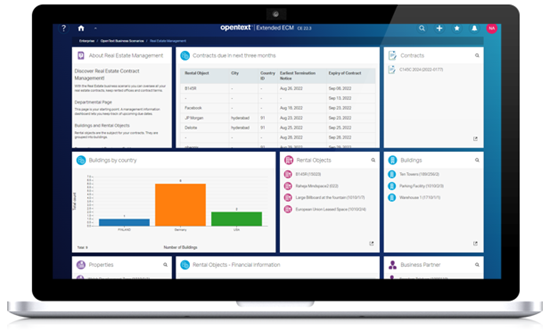
Originally released in CE 21.4, Business Scenarios are turnkey, pre-deployed line-of-business solutions that can be “turned on” at no additional cost. The Real Estate Management Business Scenario allows users to:
- Securely manage all the essential property information such as tenancy agreements, mortgage documents, fire safety plans, surveys, etc. in a centralized repository with proper permissions and user rights
- Quickly create a contract with appropriate terms using existing information on a specific property (rental object)
- Stay up to date with property leases and contracts by reviewing their renewal/termination dates up to 3 months in advance using the Management Dashboard.
This Business Scenario is designed to work independently or with SAP S/4HANA for more complex processes.
Gain superior business intelligence with interactive charts
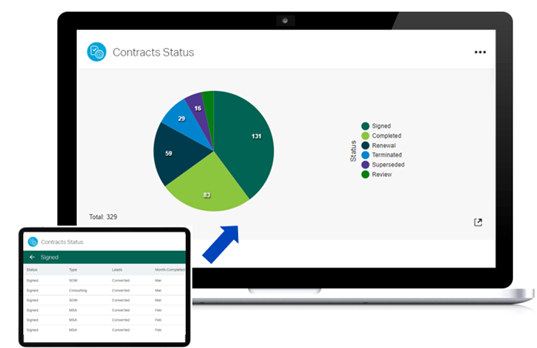
Static data visualizations like charts don’t always provide detailed information about the underlying specifics of the data. Users need a full view of the data’s makeup to truly understand the insights. By introducing interactive charts (in Smart View) in CE 22.4 users can get data visualizations that allow them to drill down and interact with data. These data visualizations allow users to:
- Perform actions such as triggering sub-reports, initiating workflows, and downloading reports without leaving the dashboard.
- Quickly identify which contracts have been signed, terminated, or reviewed by clicking on a graph (see the pie chart figure below) and then build sub-reports on the type of contract signed.
Stay away from distractions with mindful Notification Center Updates
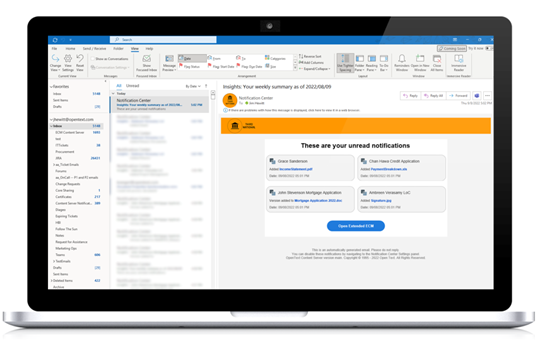
Receiving multiple notifications throughout the day regarding changes in a Business Workspace can be overwhelming. The CE 22.4 release comes with a weekly or daily email digest to alert users of the changes in a Business Workspace. This allows users to stay up to date without the distraction of multiple emails. In addition, the newly designed email template brings the familiar Smart View look and feel to a user’s inbox while allowing them to customize the email with their logos and color scheme.
June 2022: What’s new in OpenText Extended ECM CE 22.2
The Extended ECM CE 22.2 release includes new capabilities designed to help organizations master modern work.
Eliminate data silos and improve collaboration with enhanced sync to Microsoft Teams
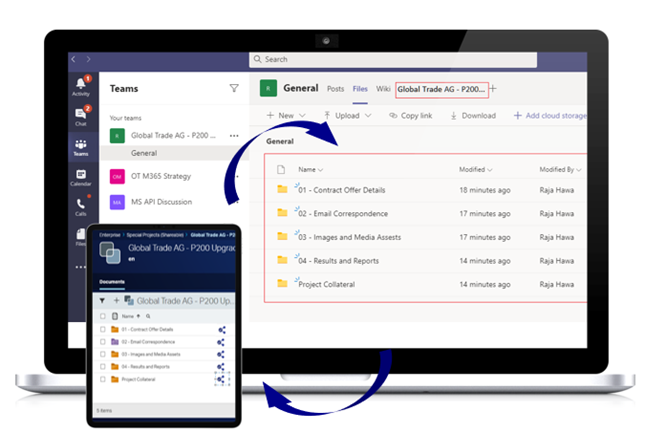
Originally introduced in CE 22.1, this release comes with bi-directional editing and versioning of files between Extended ECM Business Workspace and a Microsoft Team, thereby maintaining file integrity and eliminating potential version conflicts. This enhancement allows users to work seamlessly between their system of collaboration, such as Microsoft Teams, and a system of record such as Extended ECM, maintaining a single source of truth.
Stay up to date with the Notification Center updates
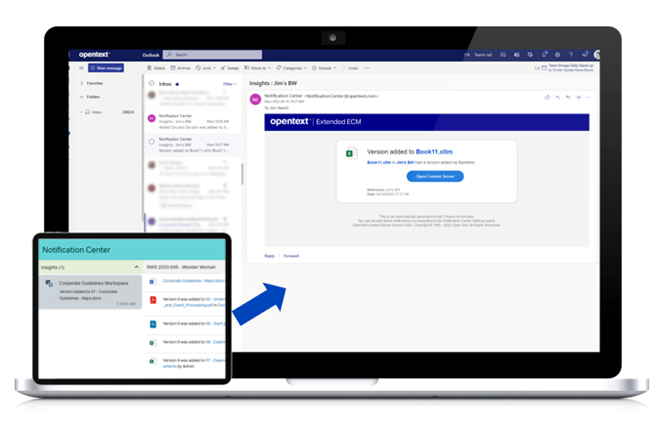
Initially introduced in CE 21.3, Notification Center continues to evolve as the collaboration hub in Extended ECM. This release has added e-mail as a delivery channel for all Notification Center updates. This means that users can enable e-mail delivery of messages sent to them through Notification Center, promptly receiving changes to their watched Business Workspaces, Content Syndication operations and more.
Make content administration seamless with the new Content Manager role
To improve content administration the new Content Manager role allows designated user accounts to bypass permissions and enter a mode enabling access to most of the content in the Extended ECM system; thereby allowing them to self-service content administration and completion of tasks such as un-reserving documents or altering permissions without relying on system administrators or, if deployed as a managed cloud service, OpenText Support.
Increased software scalability and availability with Kubernetes Deployment
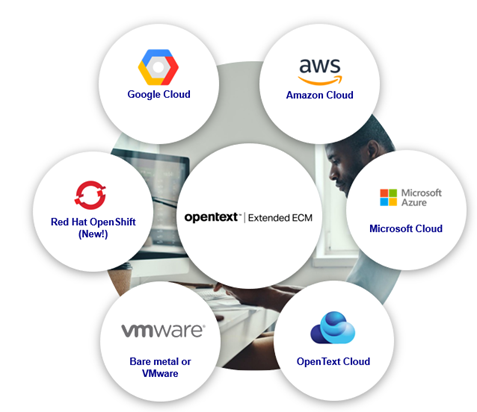
Extended ECM is now supported on Red Hat OpenShift, providing flexibility for customers to run their Extended ECM solutions in the cloud or on-premises environments, especially for those in heavily regulated industries such as Banking and Financial services.
Improved user experience for the SAP Enterprise Asset Management Business Scenario
CE 22.2 enhances existing features within the SAP Enterprise Asset Management Business Scenario, such as Completeness Check, Metadata Widget with related Business Workspaces, and Team Widget. With the Completeness Check, users can see which documents of a particular document type are missing, such as manuals, technical drawings, work instructions, analysis results, etc. The Metadata Widget provides users with an aggregated view of related Business Workspaces. Finally, the Team Widget enables users to see who is responsible for specific assets or workspaces. Learn more about Extended ECM Business Scenarios.
Seamless integration of dynamic workflows
Dynamic workflows from OpenText™ AppWorks™ provide a way to forward responsibilities and include additional reviewers after starting a workflow within OpenText™ Extended ECM for Government. This integration gives users the flexibility to adapt the steps and tasks for complex case management-based work, thereby connecting information, knowledge, and people to resolve cases seamlessly.
Simplified software delivery for easy administration
With CE 22.2, we have consolidated the software delivery and installation of the complete portfolio of Extended ECM products. This simplifies deployment and administration whether your system is on-premises or in the cloud. Consolidated delivery improves efficiency and reduces the risk of error during deployment as administrators no longer need to identify, check compatibility, check availability, and install modules individually. In addition, with a clearer view of all the capabilities offered across the portfolio, it’s easier for organizations to adopt the Extended ECM model to address new business requirements and use cases.
Magellan Risk Guard integration
With its seamless integration to Extended ECM, Magellan Risk Guard together with the new OpenText™ Magellan BI & Reporting integration enables business users to create custom interactive reports without needing assistance from experts in AI, Data Science or analytics. With access to the new reporting capability directly in the Magellan Risk Guard UI, users can report on the types of risky data that are the highest priority for their department or job role.
Looking to upgrade to the latest version? Find out how you can accelerate your upgrade by working with our OpenText Professional Services team.