What’s new in OpenText Trading Grid Aviator
Discover what’s new with OpenText™ Trading Grid Aviator and how AI is helping users find answers, uncover insights, resolve issues, and take action faster across B2B operations.


B2B operations generate enormous amounts of information, but finding the right answer, understanding what is happening, and knowing what to do next can still take time. OpenText™ Trading Grid Aviator brings AI directly into OpenText™ Business Network, helping users turn that operational complexity into accessible, actionable business intelligence.
Embedded across Business Network applications, Trading Grid Aviator provides one conversational AI experience for interacting with transactions, trading partners, communities, mappings, integrations, and product knowledge. Business and technical users can ask questions in natural language, uncover issues and anomalies, understand errors, gain visibility across their trading community, and get guidance on next steps—without navigating multiple systems or relying on deep technical expertise.
As Trading Grid Aviator continues to evolve, this blog will track the latest capabilities and enhancements—and how they are making complex B2B operations easier to understand, manage, and act on.
July 2026: What’s new in Trading Grid Aviator 26.3
Trading Grid carries more than 32 billion transactions a year across a network of over 1.8 million trading partners. That scale is only an asset if the people who run your integrations can find what they need inside it.
Trading Grid Aviator is the intelligence layer that makes that possible. Ask a question in plain language and get an answer grounded in your own data. No screen-hopping, no ticket, no waiting.
Release 26.3 delivers four new things: conversational access to your community and account data, mapping logic that explains itself in plain language, a single governed foundation for AI across the Business Network, and a clear step up in answer quality.
Explore your community data by asking
Finding out how many active users sit under your company, which mailboxes belong to which account, or what identifiers a business unit uses has always meant clicking through several screens and knowing which screens to click.
With 26.3, you can just ask. Community Insights brings your account and community information directly into the Trading Grid Aviator conversation:
- “Share the details of my company.”
- “How many users, mailboxes and EDI identifiers do we have?”
- “How many active and inactive users are there under my company?”
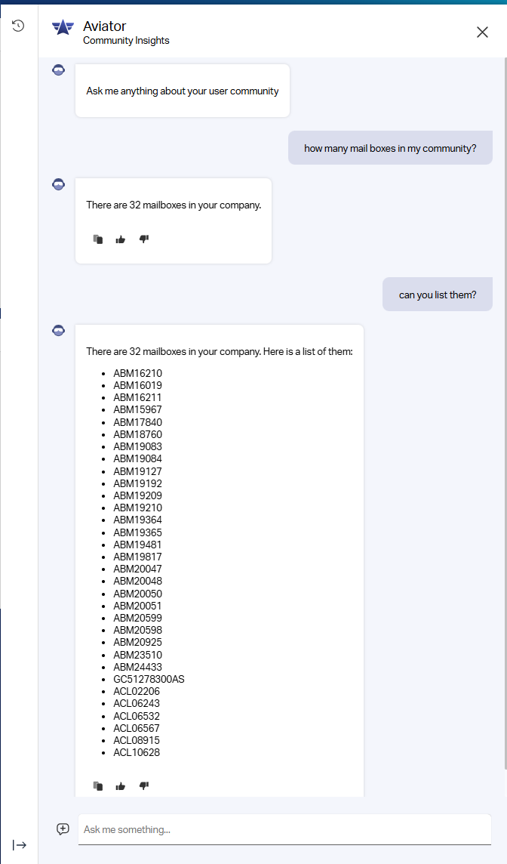
Community Insights answer in Trading Grid Aviator
Answers come back in seconds, laid out as clean tables rather than raw data. And because Trading Grid Aviator keeps the thread of the conversation, you can follow up. Ask “what about last month?” and it knows what you mean.
Two things make this more than a search box.
It answers as you. Responses are personalized to the signed-in user. Trading Grid Aviator draws only on the account and community that user is entitled to see, and turns down questions outside that scope. Credential and password requests are refused outright.
It’s a conversation, not a form. No filters to set, no fields to complete, no navigation path to memorize. You ask; Trading Grid Aviator answers.
For the managers who run business analysts and integration specialists, this is straightforward self-service. Routine account questions stop becoming support requests, and specialists spend their time on integration work instead of information hunting.
A foundation for agentic AI
Community Insights is the first capability to arrive on a new foundation, and that foundation is the more consequential part of this release.
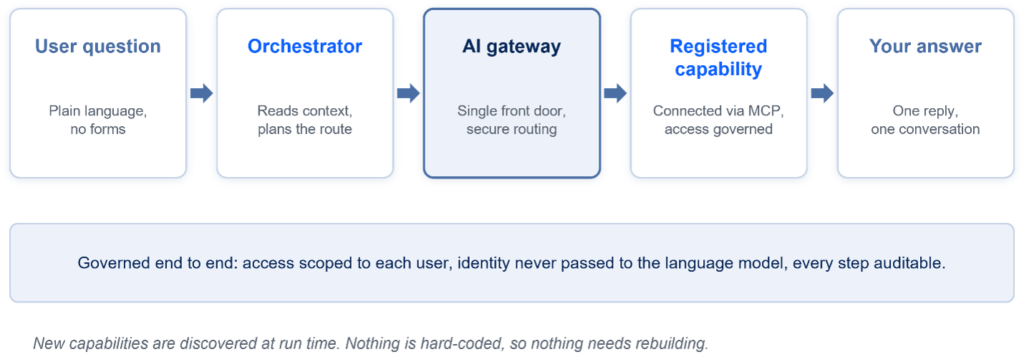
Every request follows the same governed path
Every AI capability in Trading Grid now runs through one governed front door. Access is scoped to what each signed-in user is entitled to see, your identity is never passed to the language model, and every request is authenticated, routed and audited the same way. One security and governance model, applied consistently, however many capabilities are added.
Capabilities connect to that front door using Model Context Protocol (MCP), the open standard for connecting AI systems to the applications they act on, and are discovered at run time rather than hard-coded.
Behind every question sits an orchestrator that does four things:
- Understands context. It reads the conversation history to work out whether this is a new request or a follow-up.
- Plans. It checks which registered capabilities can answer, and decides the order to call them in.
- Invokes. It calls the selected capability through that same governed path.
- Responds. It returns one answer, in one conversation.
Why this matters to you: every new capability inherits the same controls, so the security and governance questions do not get reopened each time something is added. And because authentication, conversation history and access rules are handled centrally, new intelligence reaches you sooner.
Answers you can rely on
Trading Grid Aviator 26.3 is our biggest quality release yet. We spent the cycle on the things that separate an assistant people try once from one they use every day. Retrieval is sharper, so Trading Grid Aviator is less likely to say “I don’t have that information” when the answer was there all along. Multi-step answers come through complete, formatting holds together, and links render the way they should.
Just as importantly, Trading Grid Aviator is now better at understanding context and providing answers relevant to it, with stricter fallback rules that seek clarification rather than guessing. Put together, this is a meaningfully more consistent Trading Grid Aviator experience, one built to earn trust on harder questions, not just the easy ones.
Mapping that explains itself
Trading Grid Aviator now understands mapping, not just documents. Ask how a field gets populated and it traces the value from source to target, showing every rule, condition and function along the way, with a live example. Ask which rules set a target field, or which rules use a given source field, and Trading Grid Aviator returns the answers with rule IDs and links to open them directly.
What used to mean opening a map and reading rule logic line by line is now a plain-language question, answered in seconds, with no ticket required. For a business analyst picking up an unfamiliar map, that is the difference between an afternoon of tracing logic and a two-minute conversation.
It is also the first step in a broader effort to bring this kind of map intelligence to more of the mapping workflow.
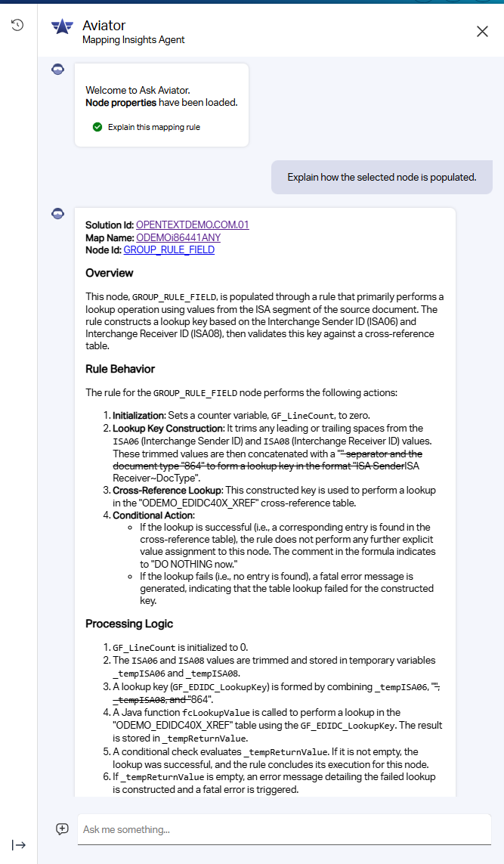
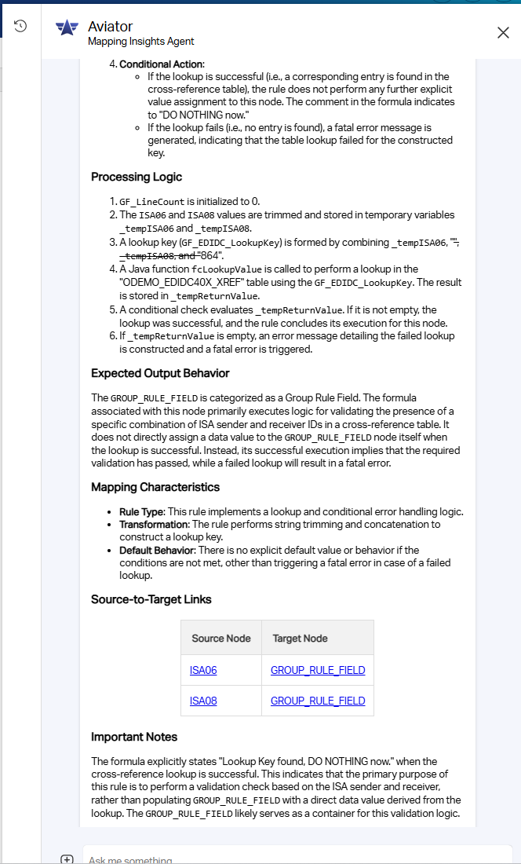
Mapping rule with its plain-language explanation
The bottom line
26.3 changes what Trading Grid Aviator is. It moves from a system that answers questions about how Trading Grid works to one that answers questions about your Trading Grid: your company, your users, your community, your maps. And it does it inside a governed, extensible architecture built to carry much more.
Your data has always been there. Now you can just ask it.
Where we’re heading
The foundation is built to grow, and it will. Expect Aviator’s view of your community to widen, and expect the experience to become more intuitive, with more questions you can simply ask.
Read our blog about how AI is reshaping supply chain ecosystems.