At OpenText World 2025, the Content Cloud team unveiled how enterprise AI success starts long before you deploy a large language model—it begins with your content foundation. This keynote transcript captures the complete session, featuring live demos of Content Aviator, real-world customer stories from organizations like the U.S. Department of Energy and Burgenland Energie, and OpenText’s four-pillar AI roadmap. Whether you’re exploring AI-ready content management or looking to understand how digital knowledge workers can transform your enterprise, this session provides the strategic framework and tactical examples you need.
Watch the keynote video or scroll down for the complete transcript.

OpenText Content customer testimonials
Fausto Brembilla, SVP, Head of Global Delivery, SAP
“We have 110,000 employees in 70 different countries all over the world. We’ve been doing manual work to ensure compliance with GDPR in terms of data deletion and data cleansing. But the other side was also the ambition to improve the user experience internally. Going for a modern solution that will be the platform for innovation going forward. We tried efficiency to be able to free up capacity for us to be there for the employee.”
See how SAP streamlines compliance processes for millions of HR records
Manu Velayudhan, Director of SAP Operations, ScottsMiracle-Gro
“We had a multiple number of legacy and out-of-support DMS systems. When I got to see what the Core Content does for us, which is more of a SaaS-based solution, that you really don’t have to manage the servers or the infrastructure side of things, it made real sense for us. Business users have firsthand experience of how the SaaS-based solution works. It was much more easier compared to the old ECM. It’s really a win-win situation, both for the business and IT.”
See how ScottsMiracle-Gro realizes cost savings by switching to SaaS
Pi Lindström, People Data & Process and Support Leader, SAS
“Today, we are having a completely different process. It’s all integrated, which makes it easiest for us to build on for the future. We have gained efficiency. We have saved 200 hours per month just by generating contracts in OpenText instead of the manual work. And that’s wonderful.”
See how SAS saves thousands of hours a year on people-related tasks with OpenText
Lindsay Fernandez, VP, Enterprise Services, Catalent Pharma Solutions
“Having the ability to improve our operation by using tools such as Documentum enables us to be more efficient in getting product to the patients, helping us be more competitive in the marketplace. But I think more so we are changing people’s lives.”
See how Catalent boosts speed and quality in drug development and manufacturing
The foundation for AI success: Why content quality determines AI quality
Lindsay Sterret (Product Marketing Lead, Content Cloud): My name is Lindsay Sterret. I lead product marketing for OpenText Content Cloud. And on behalf of the entire team, I just want to take a minute to thank you all for being here. I think we have customers that have traveled as far as Saudi Arabia, New Zealand, Dubai. We have customers who have been partnering with us for 10, 20, even 30 years. And that’s truly incredible. And we’re really grateful for your continued partnership. This week is all about you, our customers and partners, and we’re really excited to show you where we’ve been, what we’ve been up to, and what we have coming up next.
Because the next chapter of content isn’t just about how you manage it. It’s not just about content and context, but it’s about how you make that or turn that into intelligence with AI and context, as you heard this morning. So let’s start with something that I think we can all relate to. AI is having a bit of a moment. You literally can’t escape it. It’s in every boardroom conversation. It’s in every news feed. It’s in our product launches, and it’s actually even being taught in our classrooms.
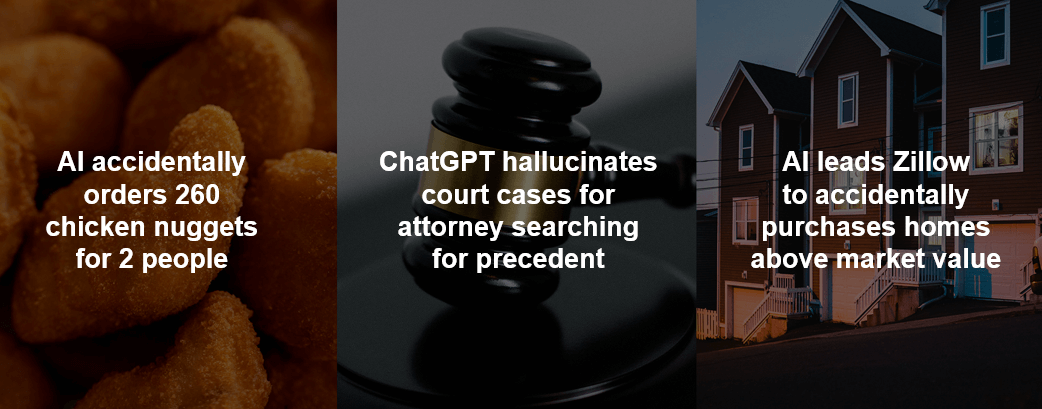
But for every breakthrough, there is a headline that reminds us that not all AI is created equal. Some of these stories here are harmless, like the AI powered drive-thru that ordered 260 chicken nuggets for two people. Not going to lie, I wouldn’t return that order. Or the attorney who used ChatGPT to write a brief that was full of AI hallucinated cases, including fake names, docket numbers, citations. Or even Zillow who used AI and unintentionally purchased homes well above market value, resulting in a $300 million write down and thousands of layoffs.
All these stories point to the same truth that the difference between AI chaos and AI confidence comes down to the information foundation. And that’s really what today is about. It’s about showing you how to build that foundation so that AI can deliver on its promise securely, accurately, and at scale.
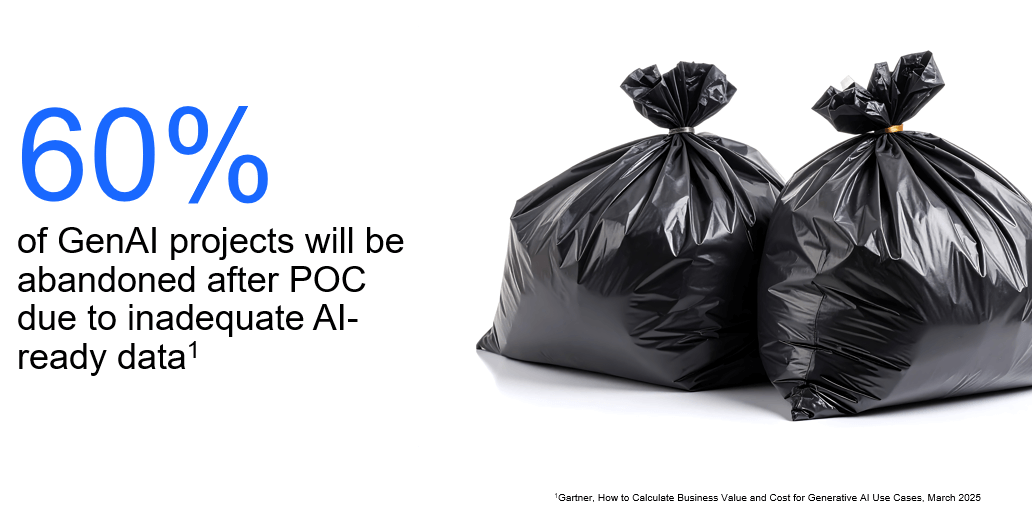
So the data backs it up. According to Gartner®, 60% of GenAI projects will be abandoned after POC. 60% of initiatives won’t make it to production. This isn’t a technology problem. This is actually a content problem. The quality you get from AI is only as good as the content that you put into it. Garbage in, garbage out. Companies are quickly realizing that AI success begins long before you deploy an LLM. It starts with content that’s secure, accurate, governed, and contextual.
And somebody who’s actually written the playbook on AI readiness is an organization, the US Department of Energy. I’m pleased to welcome Matt Forrester from the US Department of Energy to the stage.
OpenText customer story: How US DOE automates document processing at scale
Lindsay Sterret: Welcome, Matt.
Matt Forrester: Thank you.
Lindsay Sterret: All right. So why don’t we start with you just giving us an overview? What’s your role at the US Department of Energy and what’s your partnership with OpenText today?
Matt Forrester: Well, I’m an information architect and I support their content management systems. And I’ve been doing this since the late ’90s. So we’ve had Documentum and other platforms, and now we’re trying to transition those into, I guess, more usable formats where people can find documents quickly.
Lindsay Sterret: Awesome. 30 years. That’s a long time. That’s awesome. And you recently started working with OpenText Knowledge Discovery. Can you tell us a little bit about that project?
Matt Forrester: Yeah, so we’re doing a proof of concept with OpenText Knowledge Discovery. We’re basically trying to get documents that are hard to process into content management systems like media, audio, basically CAD drawings, lots of different documents that are very hard mediums for content management systems to handle and people to find them. And so now, with Knowledge Discovery, we can process documents. We can bring the documents into the system, have it, basically, where they’re easily searchable with no issues. So it’s been a really good find. And we’re nine weeks in. So we’re very, I guess, on the early process of that. But so far it’s been amazing. It’s the coolest tool I’ve ever got to work with. So it’s very neat to play with, I can tell you that for sure.
Lindsay Sterret: Can you elaborate a little bit more on the use cases? So I heard Rich Media analytics, I think, when we spoke earlier you were talking about PII identification and redaction. Can you maybe give us a little bit more color around that?
Matt Forrester: So we’ve built some neffy flows, but we built some neffy flows to basically process any type of PII. You could do things, neat things, like have two versions of a document. You have one that your HR company can see. The other version is PII redacted. The system does the redaction for you. It’s fully customizable to not redact things and redact specific things. But that’s a very easy process. It took us 30 minutes to set up.
Lindsay Sterret: And it’s still early days, but can you speak a bit to the impact that you anticipate from your work with Knowledge Discovery?
Matt Forrester: Yes, in the document world, you get lots of documents and you’re trying to get them where they’re very searchable and findable. And so you have stacks of millions, tens of millions of documents. And in some cases, hundreds of millions. And you’re trying to get those to where those are easily searchable. And you can ask and answer questions quickly based on those documents, which 10 years ago, that was paper. Nobody dreamed about asking a question to a piece of paper. Well, today, you can scan that paper, ask Knowledge Discovery questions about that paper, and get answers back. And with chatbots you can physically talk to it. So that’s come a long way in just a short amount of time.
Lindsay Sterret: Something else that you talked to me about when we spoke a few weeks ago was that you’ve got teams of people who are focused on summarizing these lengthy documents. What’s the potential impact that you see with freeing up that team to do more strategic work?
Matt Forrester: Well, I mean, it takes a lot of time and a lot of money to basically index the documents. So you have a document coming from another system. Somebody has to sit down and write a summary, titles, authors, document numbers. Well, with the AI, we’re finding that we can use the LLMs to basically help get summaries, documents, titles, those of things automatically in a system without a person touching it.
The other cool thing about Knowledge Discovery is it has connectors. So instead of you’re getting documents produced by a system that are output and then re put in manually into your system, Knowledge Discovery can reach into those systems, get data and get your documents and metadata out. So like with we’re using Documentum at UCOR, and it has a full connector to Documentum. So you can do we’re doing some cool things with we have half a million rad surveys. And so they come in with a title and that’s all you about them. Well, now with when we basically to send them to a federal repository, we have to have summaries of those documents. Well, Knowledge Discovery will generate those summaries on half a million documents quickly. I can put those summaries in as revisions and then we have those and we can basically store those. And when we send them the Federal Records Center, they can handle those. So that’s going to be I mean, somebody’s going to have to write half a million summaries or AI can just do it today.
Lindsay Sterret: So it’s both a productivity use case as AI but it’s also a key compliance use case.
Matt Forrester: Absolutely. Yes, it does both. Absolutely, yes.
Lindsay Sterret: So what’s next on your roadmap then? You’ve talked a lot about Knowledge Discovery as this tool that you use for the AI preparation. What do you see coming next from the department?
Matt Forrester: So I guess some areas that we’re going to try to attack next is the destruction schedules have to be assigned to every document. So every document gets a retention schedule. And so we have two different areas that are working on AI to basically help the tool assign a retention schedule to a document automatically. Right now, there still would be man-in-the-middle. The AI would suggest, and then you would let the person would do the final selection. But maybe one day, it could do that without any problems all by itself. But that’s one area.
Another area is we have contract compliance. And so this is the Department of Energy and so there’s very strict compliance laid out in the contracts and other things. And we want AI to, basically, nail down the compliance. What are the rules? What has to be complied with? And then, can we take that and actually compare that to the procedures and the documents that we have and then figure out where the gaps are? And so that’s another area that’s those are the two biggest areas that we’re going to use outside of just the document management flows, workflows, the processing of documents.
Lindsay Sterret: Any plans to use Content Aviator as part of that future?
Matt Forrester: We’ve not looked at Aviator yet because we went from we were trying to get stuff outside of Documentum in, and then we realized we can process stuff that’s in Documentum with KD. We’ve not looked at Aviator. I’ve really not got to play with it yet. I probably will, but there’s been so many things going on with your team that I’ve not slowed down to even look at Aviator yet. But I think that there’s a lot of similarities, so it’s certainly possible.
Lindsay Sterret: A lot of cool things you’re already doing with Knowledge Discovery.
Matt Forrester: Yes, we’re doing a lot of neat things with Knowledge Discovery that I never thought was possible. And in the document management world, the Holy Grail is the metadata. And you don’t want somebody to retype metadata, and you’re also trusting them that they’re typing it correctly, that kind of thing where we’re going to try to use these tools to do that.
Lindsay Sterret: So any last tips or thoughts that you want to share with the audience?
Matt Forrester: Well, I would just say that Knowledge Discovery and the AI in a whole, in my world, it has to be all on prem. And so KD fills that. I need nothing from the cloud, I need nothing from anywhere. It’s got the tools to process most standard documents. I think it’s like 2030 or something formats and, I don’t know, 185 connectors. So I can connect to a lot of stuff. So it’s been a pretty easy process to build it, to deploy it. And quite honestly, it’s repeatable because I can basically export what we’ve done and hand it to somebody else and they could use it. So it’s cool how that system works.
Lindsay Sterret: You said something to me that stuck with me, that you don’t have to be scared of AI. Can you speak a little bit more to that? What your thoughts are on that.
Matt Forrester: Yeah, I mean, a lot of people were and they still are. AI replacing their jobs. And I don’t think it’s going to replace like in the document world, it’s not going to replace people. It’s going to help empower them. Because in our world, people, they give us stuff and then they want it back and then we can’t find it or they can’t find it. Well, this tool will make that where it can be very easily findable for all. And that’s pretty important.
Lindsay Sterret: And it’s on prem, highly secure and super powerful.
Matt Forrester: All permissions and all that stuff are all maintained.
Lindsay Sterret: Awesome. Well, thank you so much, Matt. It’s great to have you. And we appreciate your time.
Matt Forrester: Thank you. I appreciate it. Thank you.
The Content Cloud Platform: Enterprise-grade content management
Lindsay Sterret: So now it’s my pleasure to introduce my brilliant colleague and good friend, Michael Cybala, Senior Vice President of engineering.
Michael Cybala (OpenText, SVP of Engineering): Welcome, everybody. Thank you, Lindsay. Thank you, Matt. What a great story about Knowledge Discovery. I think it’s a great segue in what we want to discuss in the next 40 minutes. I also want to briefly draw the line between what we just heard about Knowledge Discovery and what we heard this morning, those capabilities of Knowledge Discovery being part of the AI Data Cloud, right? Because it’s so important to get ready for AI. It’s so important to understand the information which is sitting in various places in your organization, to then be able to untap it and make it ready for AI. For secure AI. And these capabilities, which we just heard are just great to start with.
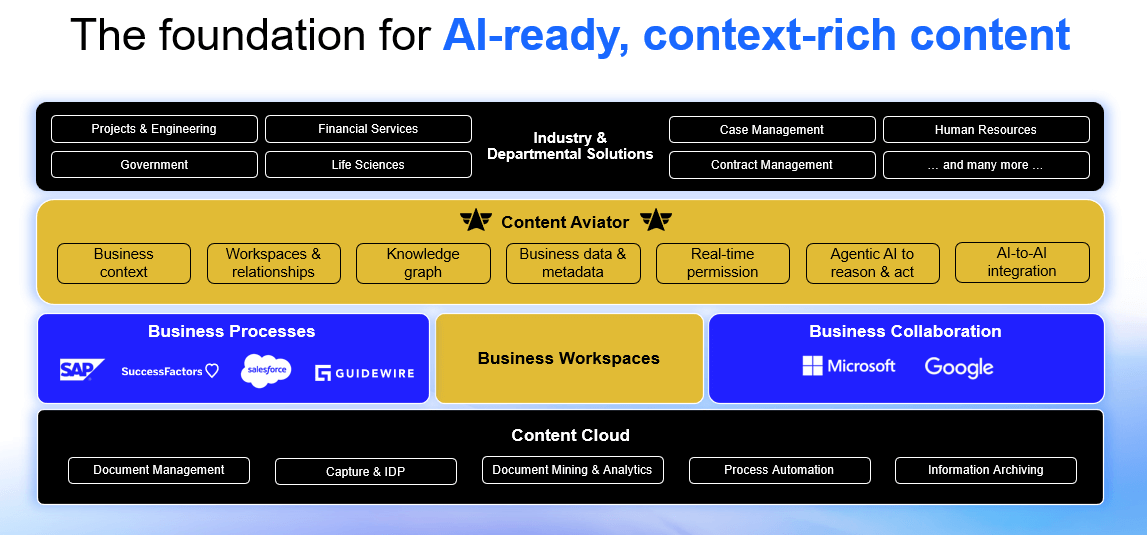
So AI-readiness is key to get value from it. You need to have your information under control and especially your unstructured data. And that unstructured data, this is just a source of information. And you have so much in your organization which can help you going forward, but it needs to be managed properly. How do we do that? Our platform is the Content Cloud. We’re convinced this is the most comprehensive foundation in the industry to help you really achieve the strategic goals, the imperatives like strong information governance, streamlined business processes, AI empowered knowledge work, and AI automation, finally.
Freedom of deployment: SaaS, private Cloud, or on-premises
And this platform is delivered with the true freedom for deployment. So we deliver SaaS with our Core platform. We deliver private cloud for content management, for Documentum Content Management or you manage it on your own. And we heard, for example, an example from Matt where he said, well, for us, everything has to be on prem, and we give and provide that freedom to you as a customer.
At the core of this portfolio, we have our market leading capabilities in document management. We have capture intelligent document processing. We have process automation workflow woven into that platform. And obviously, we have information archiving. Knowledge Discovery, as we heard, is our document mining and analytics capability. Now also part of the platform supporting 150 different connectors to be able to reach out into all those different systems and understanding lots of different file formats. We even heard 3D drawings and that thing. So it’s really a wonderful tool to make you ready for AI.
Deep integration with SAP, Salesforce, Workday, and Microsoft 365
Business integration has always been our winning concept over the last years. So we connect directly into the systems you run in your organization to run the business. This is SAP. This is Salesforce. This is Workday. This is Oracle. This is SuccessFactors. So we have integration into those systems and we also integrate into your collaboration platforms, whether it’s Microsoft Office 365 or whether it’s Google Workspace. So we bring it all together. And the concept to do that is the workspace concept. And we hear a little bit more about that concept in the following steps of this presentation.
Content Aviator: From knowledge workers to digital agents
AI is the next dimension on this platform. OpenText Content Aviator understands your structured and your unstructured information. We have graph capabilities to really be able to deliver very accurate, context rich results through AI or with AI. And we heard it today, right? Context and being 100% right is so important for AI to get to a level of automation which you finally want to get to. AI supports or Content Aviator supports the knowledge worker directly. So you have this chat capability working with the system, giving you summaries, that kind of thing. But we also give you the ability to build agents or set up a set of agents which you can combine to a digital knowledge worker.
Out-of-the-box solutions for government, financial Services, and HR
And then finally, on top of all of that, we have our industry solutions because we want to deliver value for specific industries, but also for lines of businesses out of the box. You want to get value quickly, so we have solutions for government. We have solutions for financial services, for health. And we have, in a line of business area, we have solutions for finance procurement. We heard this morning, and you, by the way, will hear more about this tomorrow on mainstage about our success vector solution, which is a digital personal file deeply embedded and integrated with SuccessFactors. So there’s out of the box solutions which you just can use. And in the world of SaaS, this is also getting more and more important because customers really want to get value very, very quickly once they start.
Why business context matters: The four dimensions of content intelligence
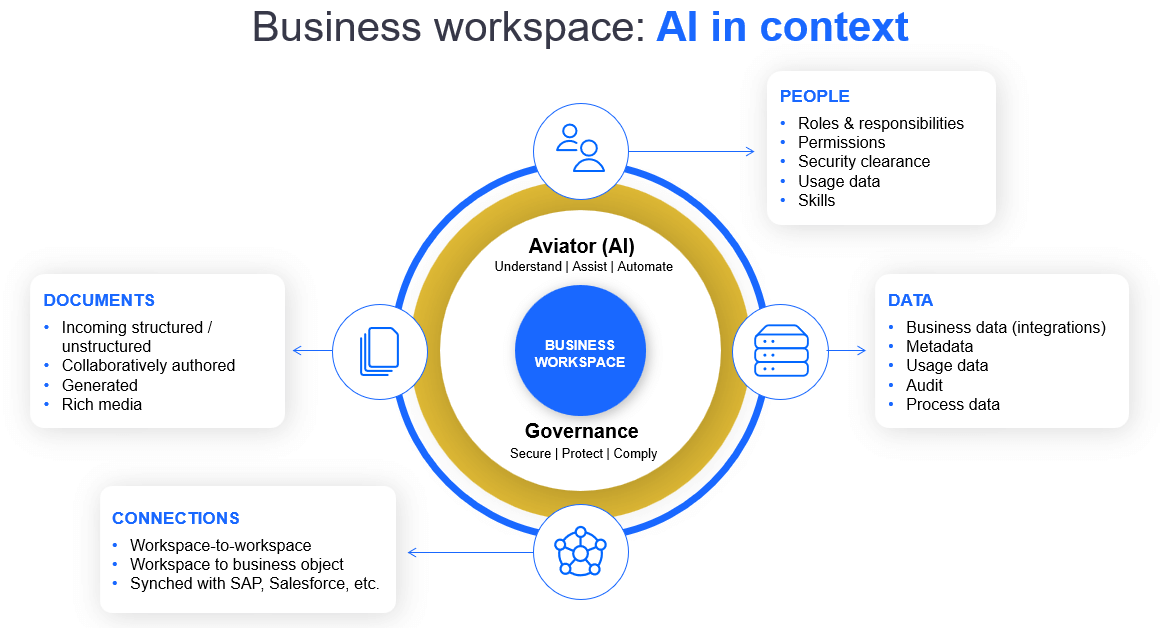
So when we talk about AI in the enterprise, we already said context is really everything. Context is so important. And AI can only be as strong as the information which we give to the AI. And this is why this workspace concept for Aviator is so important because it gives you complete governance context for the AI interaction. So the workspace really allows us and feed the AI with information about your business objects, about your customer, about your case, about your project. And we know these four dimensions around it. We know the data, which we get from the integration to the leading applications. We know the documents and the content and the information within those documents. We know people who interact with that information, and we know what those people have done, and we have connections between those.
So we know how a customer belongs to a purchase order, how a purchase order belongs to material which is part of that purchase order. And we know that the invoice belongs to the purchase order and to which customer belongs to. So these connections are very, very important to feed the system to get the best possible results so Aviator can really deliver best possible for your end users.
Major announcement: Business workspaces coming to Documentum 25.4
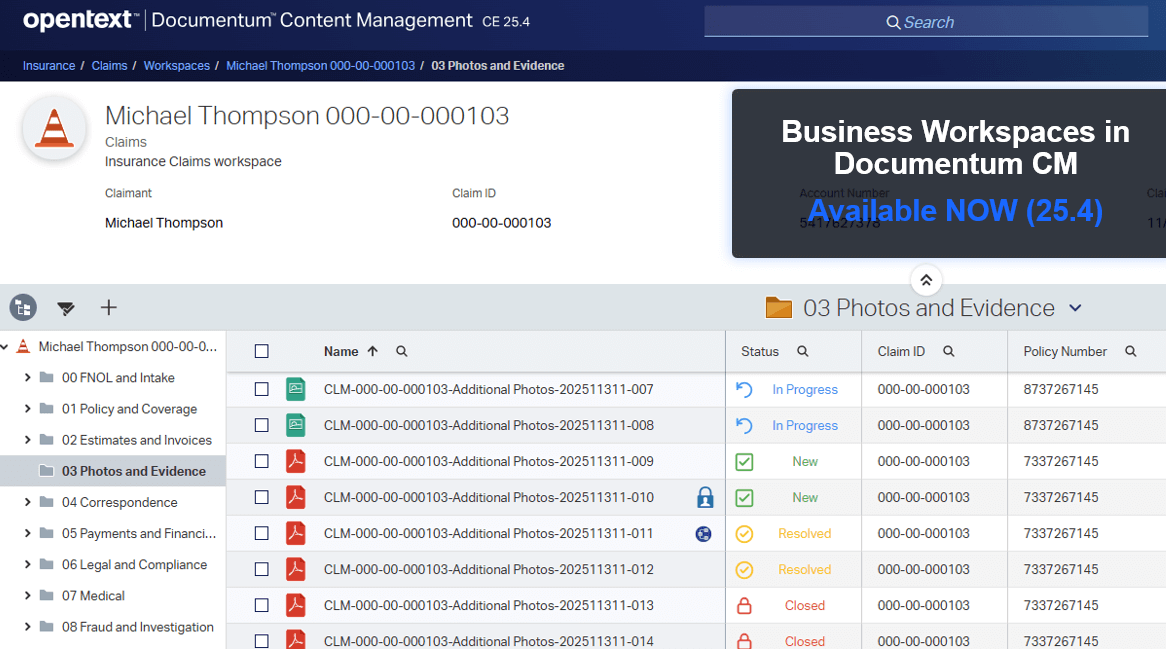
And because this business workspace concept is so important and powerful, we make it now also available for Documentum Content Management. So this is an announcement. And there’s clapping hands even, right? So, I mean, since 27. So Documentum joined the OpenText family in 2017. And from the very beginning, customers have really asked for those deep integrations which we’ve built on our other platforms and we’ve done that. But now, customers are asking for the business workspace model. And also as it comes to AI, this is getting more important, as we already said. So yes, we’re building that. We’ll make it available to you with 25.4. Already, there are a few further advancements. And then also all the integrations which are built for other platforms at OpenText are will then be available for Documentum. And by the way, for those customers who use XCP today, I think this is a super interesting concept to build this case type of applications on Documentum going forward.
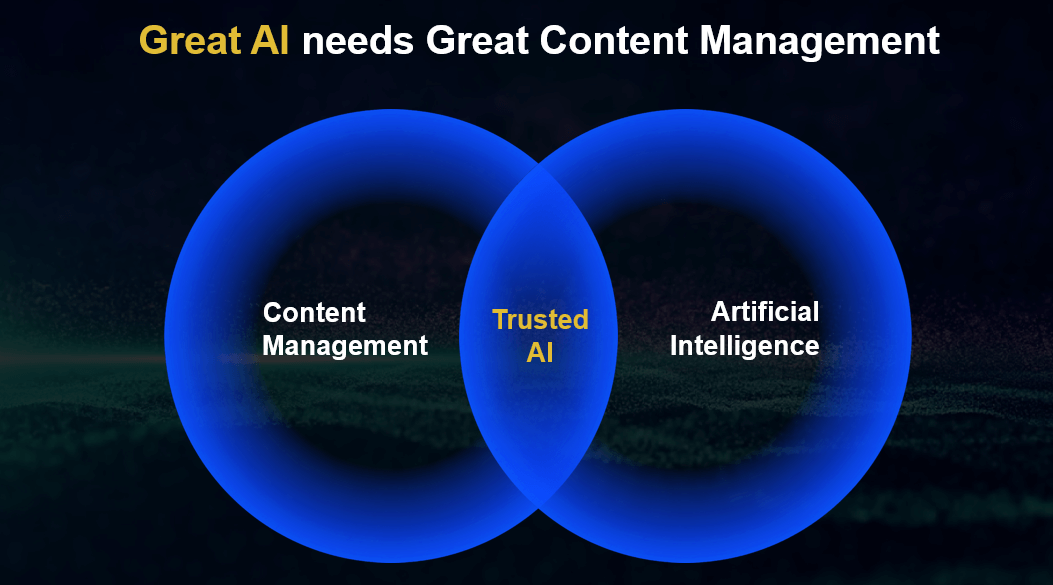
So great AI needs great information management. This concept of the business workspace is super important to combine the structured and the unstructured. And you heard it this morning, we’re moving, right, to AI in context. So our story has been for a long time content in context. Now it is AI in context. And you as our customer using our solution, in many cases, you are in a very good spot to actually get to the journey for AI.
The challenge: Staying current to unlock AI innovation
Another very important aspect to get there is being on the latest and greatest of our software. So to really fully capitalize on AI, you need to stay with the current innovation. And for some of you, this has been hard. You’re sitting in a certain place, in an on prem environment, potentially, and we’re thinking hard about how we can make that easier for you to get there. And once you get there, you cannot just leverage AI. You can also leverage the great new capabilities we deliver on those platforms. Whether it’s co-authoring. Whether it’s on content management, multilingual attributes, those of things are obviously available on the latest releases.
Migration as a product: Making modernization easier
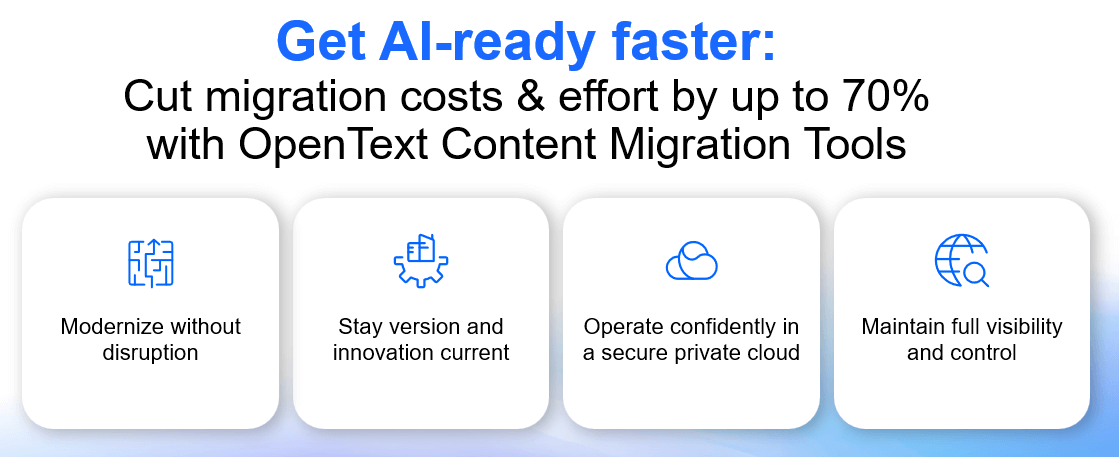
So what we’re doing is that we’re building migration as a product for you, and we want you to, again, move faster, potentially move into the OpenText Cloud with less effort. And once you’re there, once you’ve gone through that journey, you can really benefit from AI, and you can benefit from all the great new things we are building and we’re delivering to you on a quarterly basis. So Thomas Daimler, for example, in his session, in Content Management session, is going to talk about that. There is going to be a product delivered in the next couple of months, which will help you get there.
26.1 release: Free AI tier for Content Management and Documentum
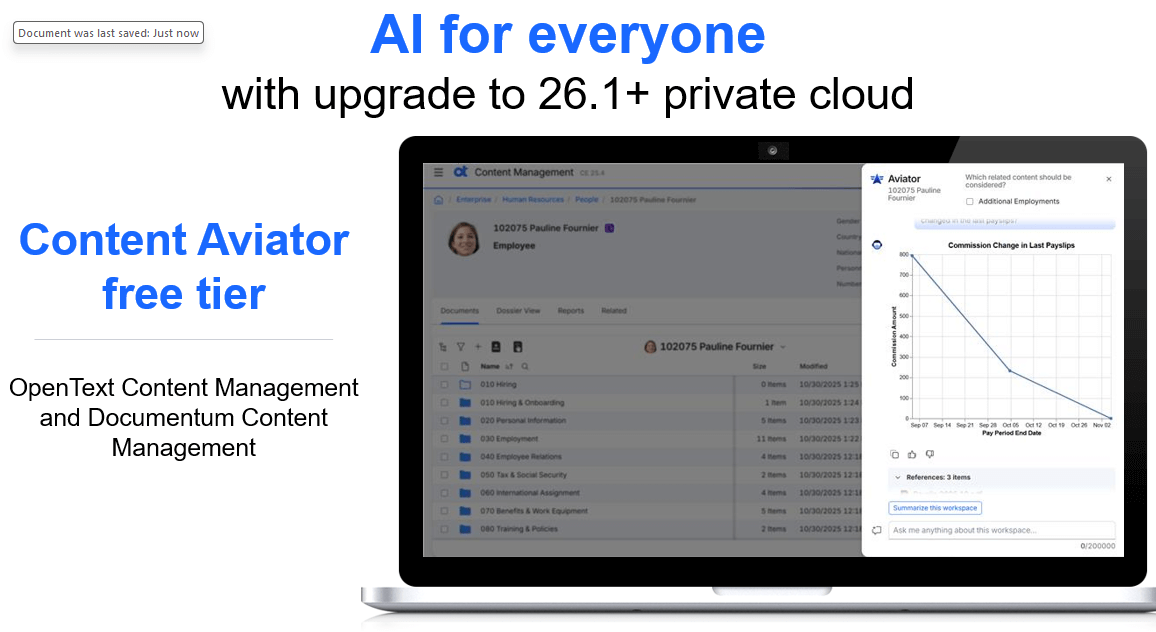
Well, and as you get there, you also now will get, as of 26.1, in the OpenText Cloud AI for free with Content Management and Documentum content management. So there’s a free tier which we’re going to deliver for you. So there’s more than one reason to actually go through migration, modernize and move to the OpenText Cloud, because you’re ready for AI and you’re really getting a lot of benefit from all the innovation we deliver to you.
Why SaaS? Instant innovation without infrastructure hassles
Now, let’s talk a little bit about SaaS and our platform Core. SaaS is obviously a real accelerator for modernizing not just how work gets done, but how fast you can get there. And Core Content gives you flexibility. You can start small and you can grow fast. So you get the full power of an enterprise grade content management with, you know, you can capture, manage, govern your unstructured information. You can optimize processes. You can collaborate internally as well as externally. And, obviously, for that platform, we also deliver AI with Content Aviator.
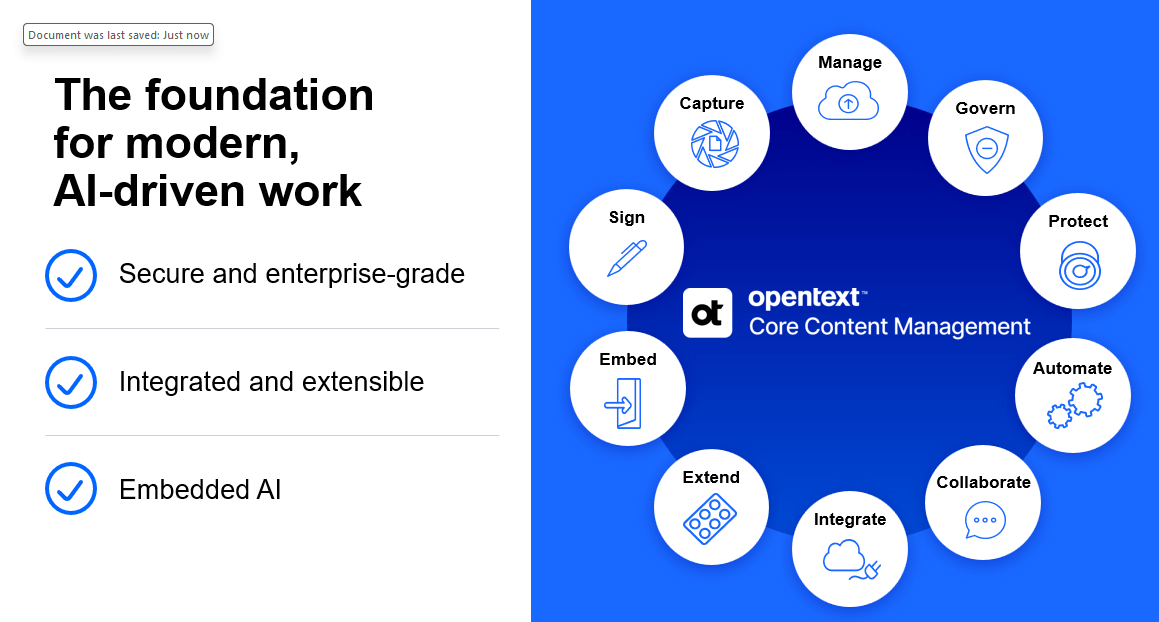
So in a SaaS environment you have instant access to innovation through the continuous updates which we’re delivering for you and you have no hassle. You don’t deal with infrastructure issues and that kind of thing. Core Content for us is the secure enterprise ready platform also integrated with your business, extendable and AI enabled. So it makes every document related process faster and smarter, and you can start with it right away.
Comprehensive content services on the OpenText Cloud Platform
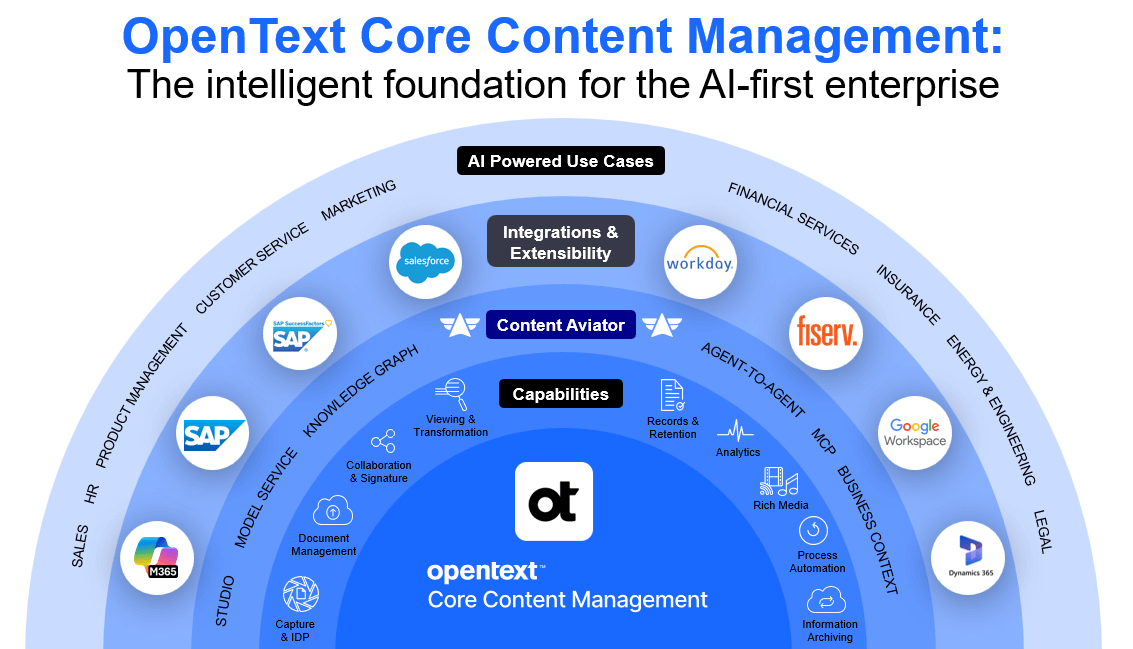
Core Content runs on the OpenText Cloud platform. And you have heard Savinay talk this morning a lot about our cloud platform, and it’s giving us scale, reliability, and performance. It delivers the full breadth of modern content services. So everything you would expect. From intelligent document processing, document management capabilities. We have rich media management capabilities on this platform as well. We have workflow. We have intelligent viewing and transformation. We have, as I said, collaboration internally as well as externally. We have records and retention management, and we have archiving all available on that platform. So everything you expect from a next generation content platform delivered as SaaS is available with our Core Content.
Content Aviator: Building your agentic AI environment
And Content Aviator, once again, embeds AI capabilities and will go far beyond what we know today. We will enable this as a full agentic environment, and you can define your own agents. You can define your knowledge workers. You can plug them into the flows within this platform and you can grow from there. So it does not stand in isolation. We have talked about the power of integration and that integration power we also bring to Core. So we integrate with SAP, not just SAPS4. Private Cloud, we also integrate.
Industry First: Certified SAP S/4HANA Cloud Public Edition Integration
And that’s another announcement with S/4HANA Cloud public edition. So we’re the first vendor having officially certified integration available in an S/4HANA environment. You just can enable it, and it is available to you as a customer.
Partner Integrations: Workday, Microsoft Dynamics, and More
We integrate with Salesforce. We integrate with SuccessFactors. We have a special digital personal file solution on the platform. We have partner integrations into Workday or into Microsoft Dynamics, and that environment is growing continuously. And we also have, obviously, the integrations into Office 365 and into Google. So everything is available on that platform. It’s a very strong and powerful platform which we’re building on.
And it’s enterprise grade. So we have now also announced a partnership with Fiserv. Fiserv is a leading provider of payment and banking solutions. More than 10,000 customers in the financial services market. And Fiserv has decided to go with Core Content underneath their banking systems. So let’s listen to Fiserv.
New Partner Announcement: Fiserv Chooses OpenText Core Content for Enterprise Scale
Jeff Moriarty, VP and Head of Decision Management Solutions,Fiserv: Fiserv’s global vision is to move money and information in a way that moves the world. And our mission is to deliver superior value to our clients through leading technology, targeted innovation and excellence in everything we do. The key focus for Fiserv is innovation for the benefit of our clients. This was the key driver for Fiserv to take a deep dive on the content management space and ultimately partner with OpenText on the new next generation offering.
Content Next is a multi-tenant SaaS solution hosted in the OpenText Cloud environment. This provides a number of benefits for both Fiserv and its clients, including scalability, rapid release deployment, and ease of maintenance. Importantly, this deployment model means everything is always up to date. Fiserv’s content management strategy is threefold. The first pillar is moving from traditional document storage to intelligent content management. Next up is automation. We look to reduce and optimize the amount of manual support required from our clients. And third is a cloud-first deployment model. And underpinning each of these pillars is compliance and security.
We are super excited about the AI capabilities within the Content Next solution. We think that the natural language search and summarization capability, combined with Workspace functionality that aligns documents to key business processes is a game changer. And we’ve started thinking about where to go from here. Beginning to explore opportunities to introduce agentic AI down the road. The AI possibilities are almost limitless and really exciting.
OpenText’s AI roadmap: Four pillars of content intelligence
Michael Cybala: So that’s a great new partnership for us. And Jeff from Fiserv is actually here. And he’s going to talk in one of our next sessions about the way forward with Content Next, which is the integration. And you’ve heard the arguments. It’s just repeating of what I said earlier. SaaS, as Fiserv is moving into the cloud, they wanted a SaaS platform underneath for content management. AI, the capabilities of AI in those financial services scenarios. Like loan origination is something which was also a big decision driver for Fiserv to go with OpenText. And we really look forward to make that partnership successful. With that, I would like to introduce Dr. Marc Diefenbruch. OpenText VP, Product Management.
And Marc is going to walk us through our AI roadmap going forward. So Marc, what is ahead for us and what is the strategy around AI?
Pillar 1: AI-first user experience: Aviator at your fingertips
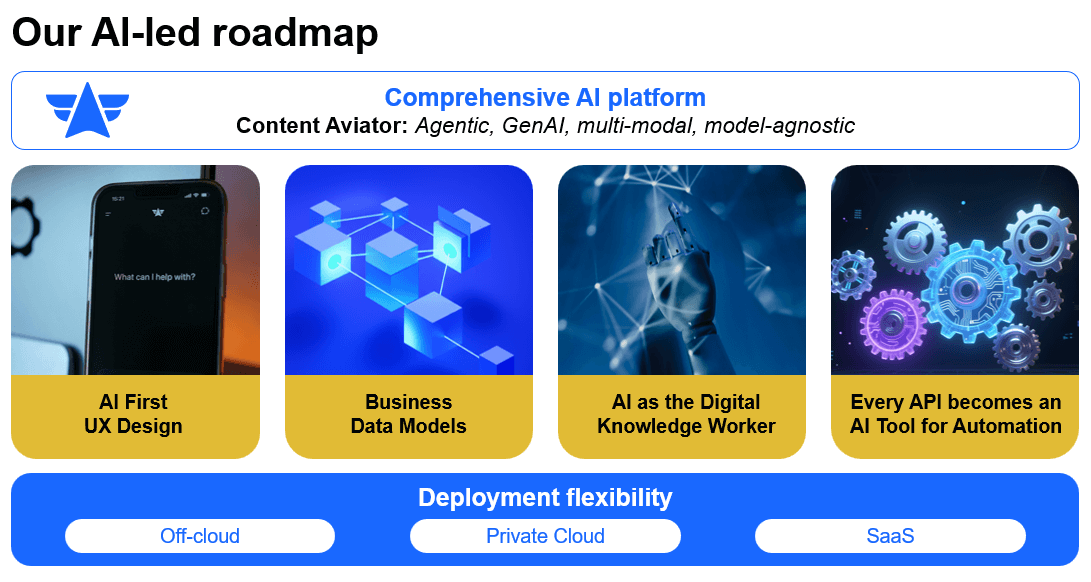
Marc Diefenbruch: Thank you, Michael. Yeah, so let’s talk about AI. You heard about AI already a lot in the morning. And how does the AI relate to our content platforms? So our AI roadmap is basically built on four core principles. The first one is an AI First User Experience that puts AI right in the middle of the content management platform. In every user interaction, we want to bring in AI so that AI is usable in interfaces like Smart View, where we have an always present, always up to date, always in context AI at the fingertips of the human knowledge worker. So that’s point number one.
Pillar 2: Understanding your business: Not just your documents
Marc Diefenbruch: The second one is super important also in the context of the Data Cloud that we heard about. AI will fully understand not just the documents and the document content, but also the whole data model that you have in our content platforms. So this is metadata. This is how things are related. The workspaces that Michael talked about to really, truly make AI do things. The first thing is AI needs to understand not just the content, but also the content application and the whole data models behind that.
Pillar 3: Agentic AI: Digital knowledge workers that collaborate
The third one is agentic AI agents. So we heard so much about agents already in the morning. We want to build agents as digital knowledge workers that can in principle, do the same thing like an end user would do in the SmartView or in other user interfaces. So basically, empowering the agent to do everything an end user could also do. And we want these agents to collaborate with humans, but also collaborate with other agents. So this is super important.
Making it real: Turning APIs into AI tools
To make that happen, the first thing is if we want to have agents that really can do things, the agents need to have access to all the tooling, to all the APIs and our content platforms, that they can really do the same thing like humans. So basically, all the APIs that we have in our content platforms that are empowering our user experience, that are empowering our integrations with leading applications like SAP, these APIs, we will turn them into AI tools. That AI can basically use these APIs to do things in the platform.
Pillar 4: Content Aviator as your enterprise AI platform
To make AI really available across all our content products, we need to make it as a platform, as an enterprise scale AI platform. And that is where Content Aviator comes into the mix. So Content Aviator will be available or is available for all our content platforms. Core Content, Documentum, OpenText Content management, formerly known as Extended ECM. It will provide the agentic capabilities. It will provide the integration with large language models, and we offer a great choice of large language models for that. And importantly, we want to meet you where you are.
Deploy anywhere: Cloud, private cloud, or on-premises
Michael already talked about the flexibility of deployments, and the same is true for Content Aviator. So, yes, we deploy Content Aviator in our cloud, in our SaaS cloud, in our private cloud. But you can even deploy Content Aviator on premise. If your requirement is, yes, we want an AI, but we can’t move into the cloud for whatever reason, or you don’t want data and information to go into the cloud. You can also use Content Aviator on premise.
So in the next minutes, we would like to go through these four boxes and show you a few examples in forms of demo. And we will start with AI first user experience design and with Michael.
Live demo: AI-first user experience with Content Aviator
Michael Cybala: Yeah. Thank you, Marc. So what we’re going to see is that the user experience is just going to be very, very different. And you will see that innovation come to you over the next quarters and years. Right now, oftentimes you start with a folder structure. And the user starts to navigate into that folder structure. The Aviator is coming up as a side panel. But we expect the Aviator really be front and center, to be the first thing you start to interact with in the system.
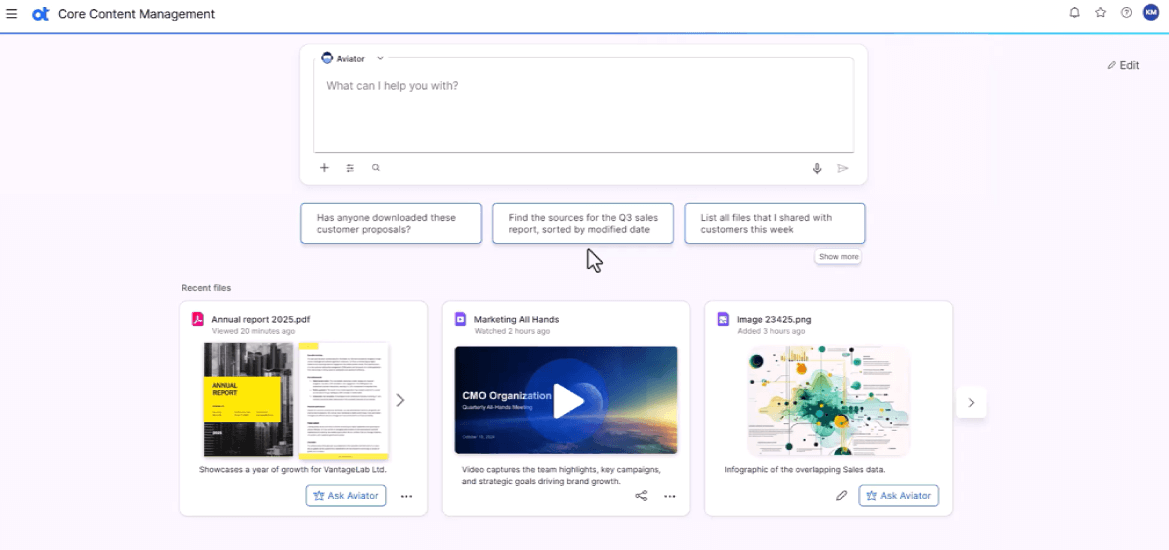
So on this well, this is a prototype, which by the way, actually can work with right in the experience lab out in the user experience area. So let’s start here. You will see that the Aviator is front and center. There are predefined prompts available. Those obviously can be configured. So you can execute as a user on those prompts right away. And we’ll get a result. There is recent files also with Aviator actions where, for example, Aviator could start to compare the versions of those files. You get your last questions. You’ve asked Aviator and the results. And you can obviously pick it up from there. And the chat window always stays on top.
Then you can also pick your agent. So if you want to use a customer service agent, you have different contexts, different actions. And then, obviously, you can start to interact with the system. You can see this here. You get a result. And then from there, you actually can navigate through that and start interacting with Aviator even further. And here in this example, right there is customer proposal documents, which get listed which are relevant to this user at this very moment, which would also come from the AI. It already shows a summarization on the right-hand side, which gets automatically created. And it obviously AI can also here just show me well, this has changed. You should put your attention here. We can all do that through AI.
The next little piece we want to show is that we also have a new concept, which you’re going to see, which is called spaces. It’s going to come with Core Content in the coming months, where people of a certain team or group can define their own areas. And obviously their, Aviator is also natively woven in. So you can see here, this is like a marketing page where Aviator is appearing on the right-hand side. And then in this specific area, in this context, Aviator can start to work, and the user can start to interact with the AI again. Yeah, that’s what we wanted to show. Over to you.
Marc Diefenbruch: Yeah. So let’s move to the next pillar, which is business data models. So this is our second pillar in our AI strategy. And it’s foundational for really truly unleash agentic AI. The first thing is the agent needs to understand how the content application works, all its capabilities. So this is really front and center. And Michael already touched on the business workspace model.
Knowledge graphs: How workspaces connect your business
So business workspaces is in a way a special folder. It has additional capabilities. But the main thing is it can build networks. It can build what we heard in the morning. It can build knowledge graphs. It can put things in relationships. You can navigate across these relationships, and you can basically build the workspace structure according to your business. So this is front and center. That is our main concept how to bring AI into business context.
So let’s look at an example, how workspaces basically build this knowledge graph. So let’s imagine an end-to-end process in sales. And you have the typical things. When you’re familiar with the sales process, you have opportunities. You have contracts. You have sales orders and delivery notes. And finally, maybe a customer support cases. So typical end-to-end process, which many of you maybe when you’re using Extended ECM have already implemented today. And these workspaces are all connected. So each blue bubble is basically standing for a business workspace. And there are people working with that. Maybe in different user interfaces, maybe in SAP, maybe in our SmartView. And there’s many more business processes and business objects around it. Like customers or products with different personas.
AI that reasons across relationships: Multi-entity queries
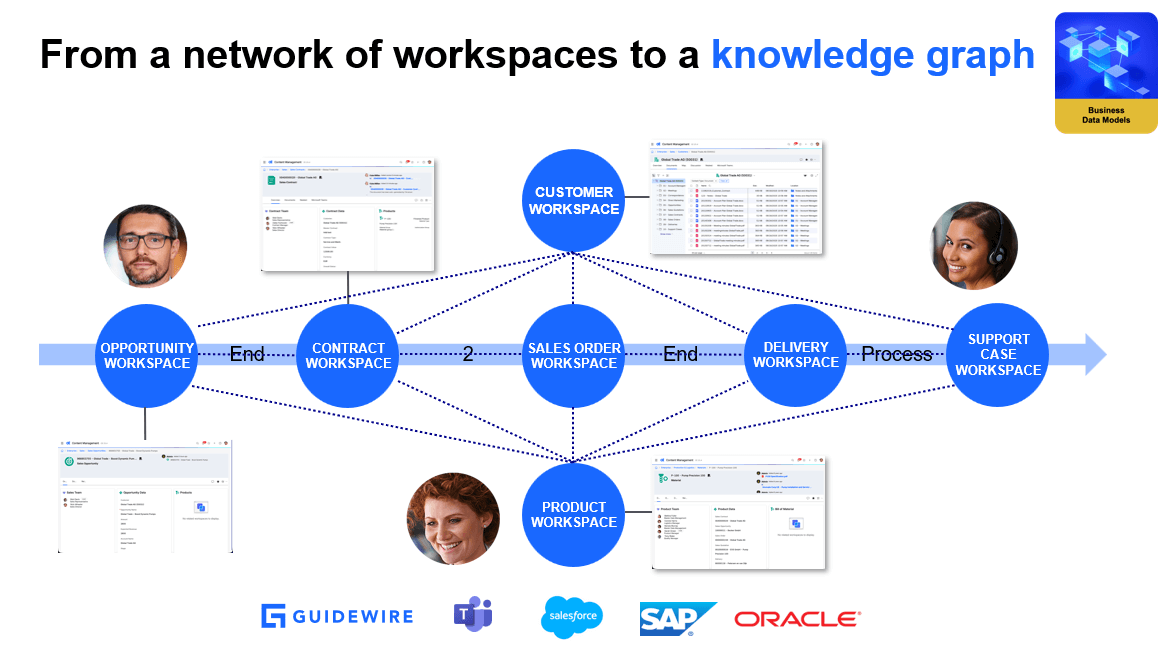
So the key thing is when you look at these blue bubbles. They are really like a network. And that is a knowledge graph that we can teach AI to understand. That is the key thing. If AI is not just looking at the documents, but really understands how things are related, what are the data models? How is the contract related to a customer? That gives AI an insight that allows it to work much better and in context. So for example, when we look here, we could support questions from users to Aviator like which contracts of customer global trade are related to product P100? This requires to understand how things are related. I cannot just look as an AI just in one place. I need to understand how things are related. I need to understand the business model.
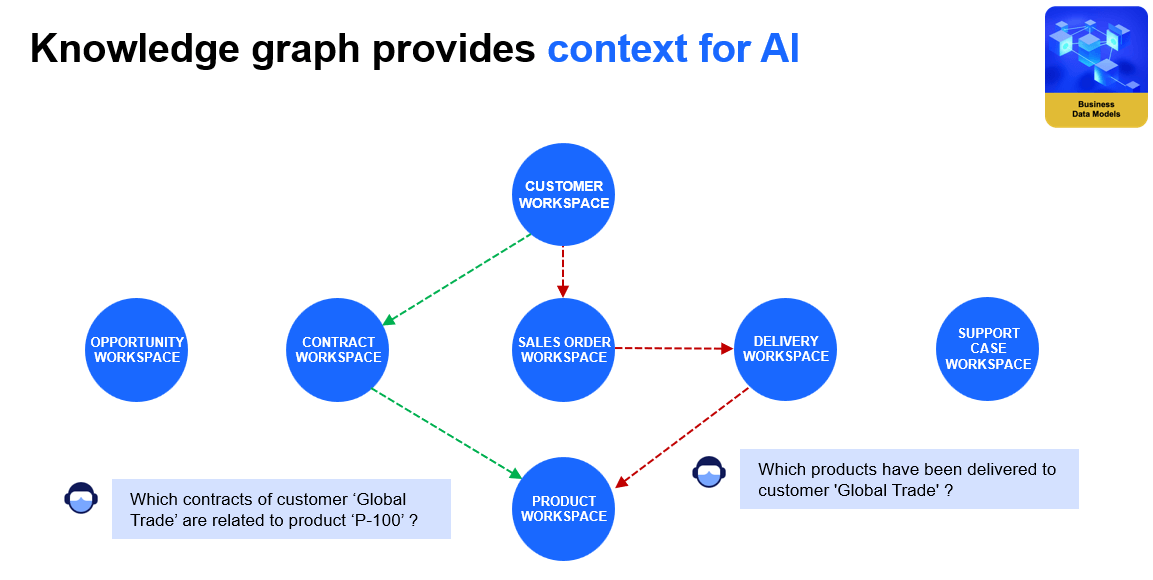
Another one could be which products have been delivered to customer global trade? In this case, the AI needs to understand that the user is asking for products, but the starting point is a customer. So basically understanding this English sentence and break it down in how business objects are related. So how workspaces are related. So let’s see that in a short demo.
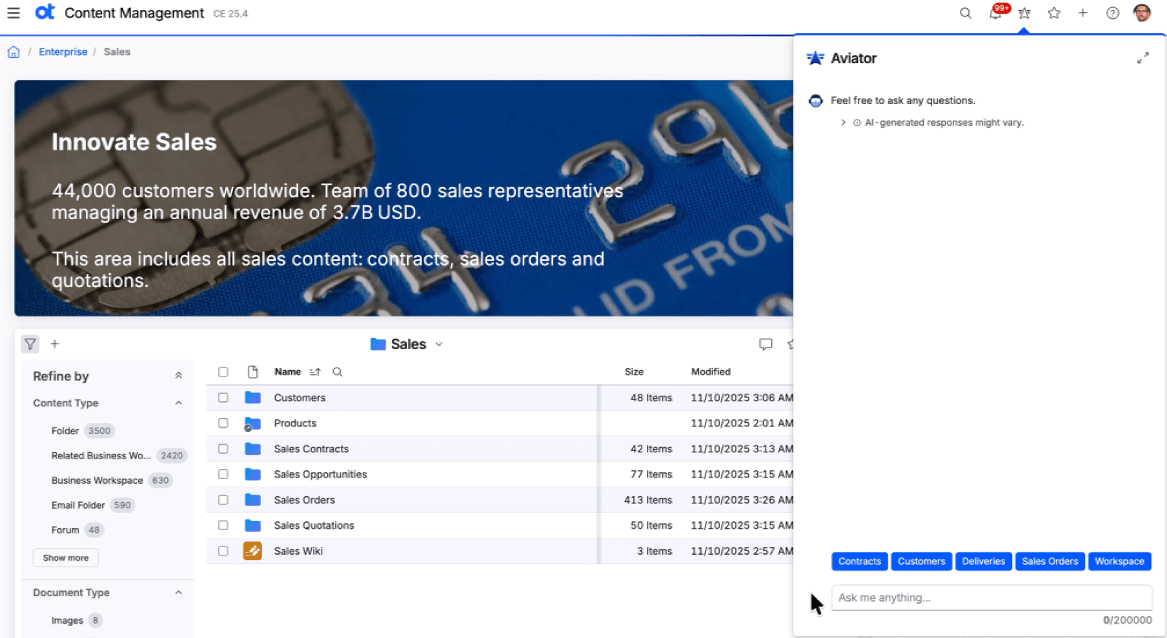
So here we see Aviator already in a sales area. So we are here in OpenText Content management 25.4 in the sales area. And you see Aviator to the right hand side, and there’s prompt templates. For example, I can ask for exactly what we have seen before, which products have been delivered to customer global trade. There’s a prompt templating that can fill in the name of the customer. And you see you get data as a result. So it’s not just about document content. You see exactly which products have been delivered to this customer and the important thing is the grounding of the AI. What things the AI is focusing on has now shifted from a general focus on exactly these four product workspaces that we have seen.
Let’s look at a second example. And for those of you that are using contract management scenario, maybe that’s a very typical one. So the question, which contracts of customer global trade are related to product P100? And here, we also need to consider three different items. It’s about customers. It’s about contracts. And it’s about product. And there’s basically two conditions, how to find these contracts. The first one is it should be customer global trade. And the second condition is it should be related to P100. But it could also be other conditions that you have. So having this knowledge graph makes the I understand what to look for. It understands the customer is asking for contracts that are related to global trade and this product.
So let’s see that in action. Again, we are using here our prompt templating which is coming with the next version. And we have a template for that. I just can put in the customer name, the product name. And the Aviator constructs the query from the user. And we get a list of contracts which are related to global trade and product P100. And again, the focus of the AI has now moved. We see 14 workspaces, which means each of these contract is a workspace and the AI now focuses for all follow-up questions on exactly these 14 use cases.
OK. So that is the power of really understanding the data model. And this is a foundation for the next steps to build agents.
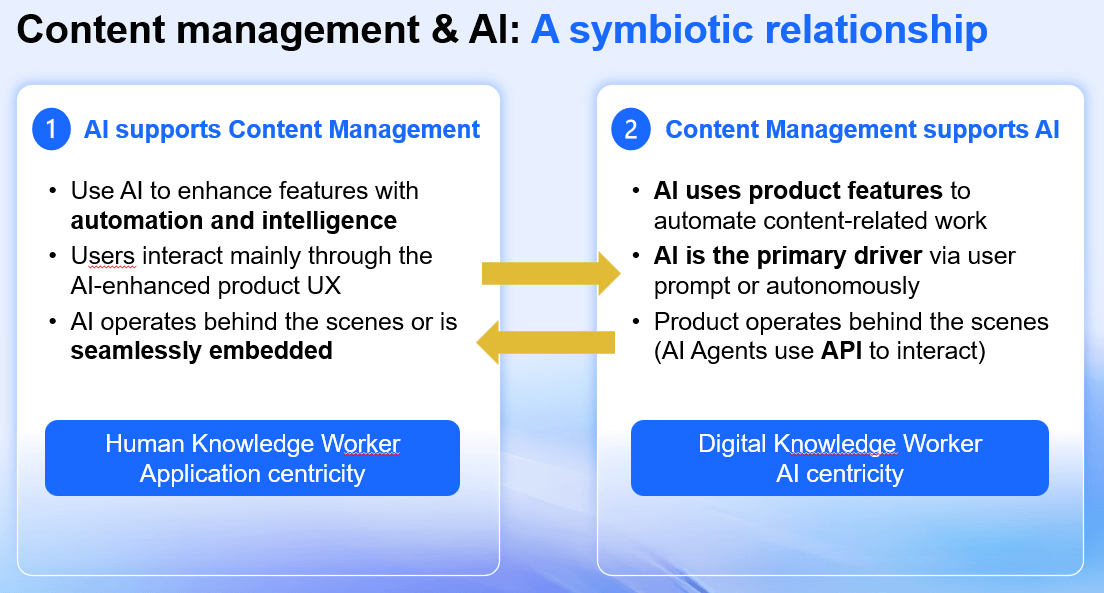
Michael Cybala: Yeah. Thank you, Marc. Super powerful. And it puts light on what we’re talking about with the context. AI in context just giving better results. So before we go there, I just wanted to repeat how we see that relationship on how we see AI in our application. On the one hand, we believe AI supports the content management application. This is what we mean. It’s be everywhere. Ubiquitous in the application. It’s going to support the user in whatever the user does. It supports the human knowledge worker. On the other side, the role of the content management system is to deliver curated content to AI, number one. And protect that content. But also make all the capabilities the features of our platforms available to the AI, so that the AI can actually act on it. So the agent can do something. The agent needs a tool to do the work, and that is work which within the content platform. For example, create a workspace, store a document, add metadata. So we make that available through standard interfaces like to A2A, like MCP, to the AI.
So the other part here is we just want to show a quick example of what this of Aviator studio concept is. In this example here, we have Core Content. We have a workflow. And the user here can actually get to this workflow map. And this is about starting a loan request, which is of a workflow definition. And here there’s an agentic step, which can be added to that workflow. So the agent would execute a task. And with this agentic task, I obviously can pick the agents, which I want to use. Those agents, they are defined in the studio and how do you do that in studio?
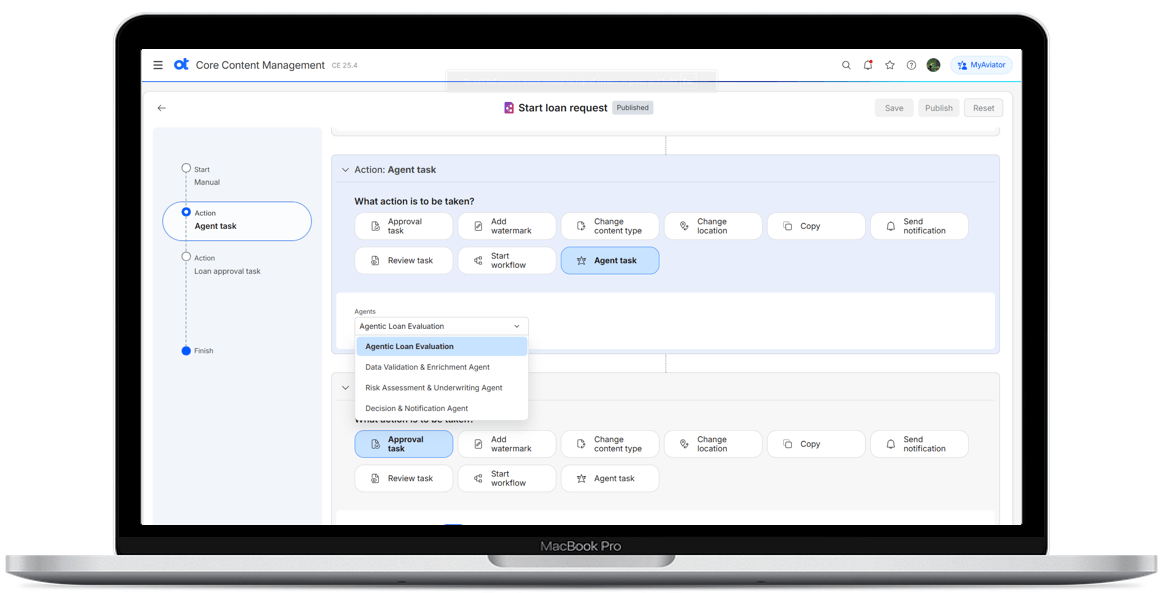
And once again, this is what you’ve also heard Savinay talk about today. Studio is going to evolve. Studio is going to be super powerful going forward. This is an earlier version of what we’re using right now. And we will advance as the AI data platform advances. But here, you can actually provide the context and define the agent. So here like you have a data validation step or agent. You have a risk assessment and underwriting agent. And you define that agent with natural language right. You give the instruction the prompt. It’s a predefined prompt, which you add here. And you define what that agent should actually do. And you also can see that this agent is picking it up from the agent, which has worked on this before. So you have this digital knowledge worker concept. This is about a loan assessment.
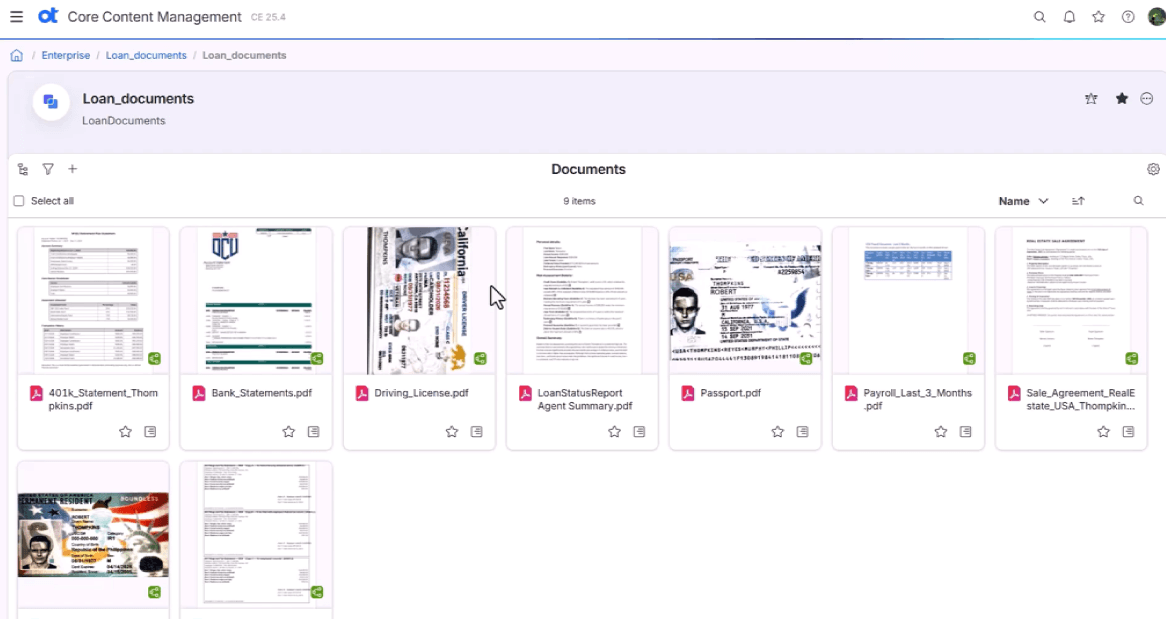
So the agent here was tasked to deliver a document based on the information which is sitting in that particular folder or in that workspace. And it delivers then a risk assessment. And that risk assessment is based on the unstructured content and the data within the system. It has gone through various steps and automatically created that risk assessment document. So that is a agentic step in a workflow in Core Content. Over to you.
Marc Diefenbruch: Yeah. I think that’s a great example to see what an agent could be. So the agent could be a workflow agent, but it can also be a very specific agent, like a loan processing agent based on that workflow. That brings us to sorry. That brings us to a quick overview of what agents we are working on. So for content management platforms, we are envisioning or we are working on agents for different disciplines in our content management.
Building specialized agents for every content discipline
Marc Diefenbruch: So obviously, document management has many manual tasks like search, like filing documents, document comparison, extract or update metadata, and so on. Workspaces our key concepts is very powerful. But sometimes for end users also complicated. For example, to set up a new workspace scenario to create a workspace. So we will have an agent which simplifies that. So this agent can find workspaces like you have seen in the demo that I showed with knowledge graph. It can retrieve metadata. It can update metadata. It can create workspaces based on templates, and it has this knowledge graph tools that also allow to reason over multiple business entities and understand how things are related.
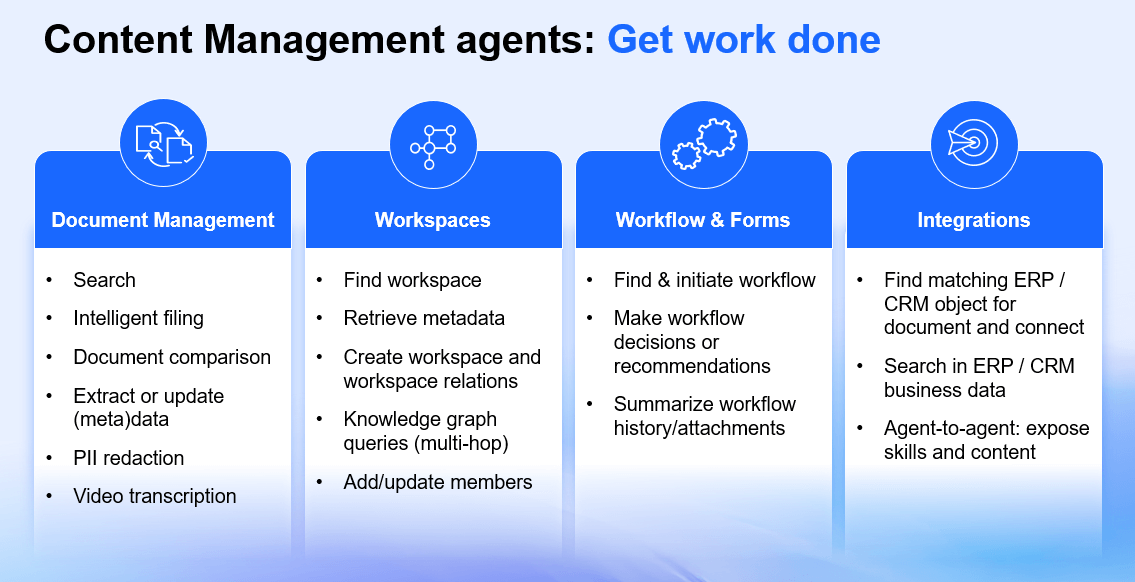
Workflow informs similar to what Michael showed. Find the right workflow. Initiate the workflow, have agentic AI steps in the workflow, and so on. And finally, integrations. Integrations into leading systems. We have deep integrations with SAP, with SAP data models, with SAP Data Cloud, and all this data we have access to. And we feed that also into our agents. And we let our agents also interact and connect with SAP and processes and objects.
Yeah. So one important point is to make that work, not just for one agents, but for many agents dozens or hundreds of agents. We also need to consider other ecosystems. It’s not just OpenText building agents every big software company is building AI agents, obviously. So that’s Microsoft with Copilot. That’s Salesforce with Agentforce. It is Gemini with Gemini Enterprise used to be called Agentspace. And of course, SAP, our big strategic partner with SAP Joule.
Open ecosystem: Integrating with Microsoft Copilot, Salesforce, Google, and SAP
So let’s have a quick look on how that looks like. So first start with Microsoft. We have integrated Content Aviator into Microsoft Copilot. So it shows up in the agent store in Microsoft. And you can just use Content Aviator right in the Microsoft ecosystem. So wherever Copilot shows up, we can have this Aviator integration, which is technically built on a custom engine for Microsoft Copilot. And you can see, you can ask questions in that Copilot ecosystem. But using Content Aviator as an engine, and you can basically get answers to questions, which only the content that is sitting in OpenText can basically answer. And you see also that Aviator can generate graphical output.
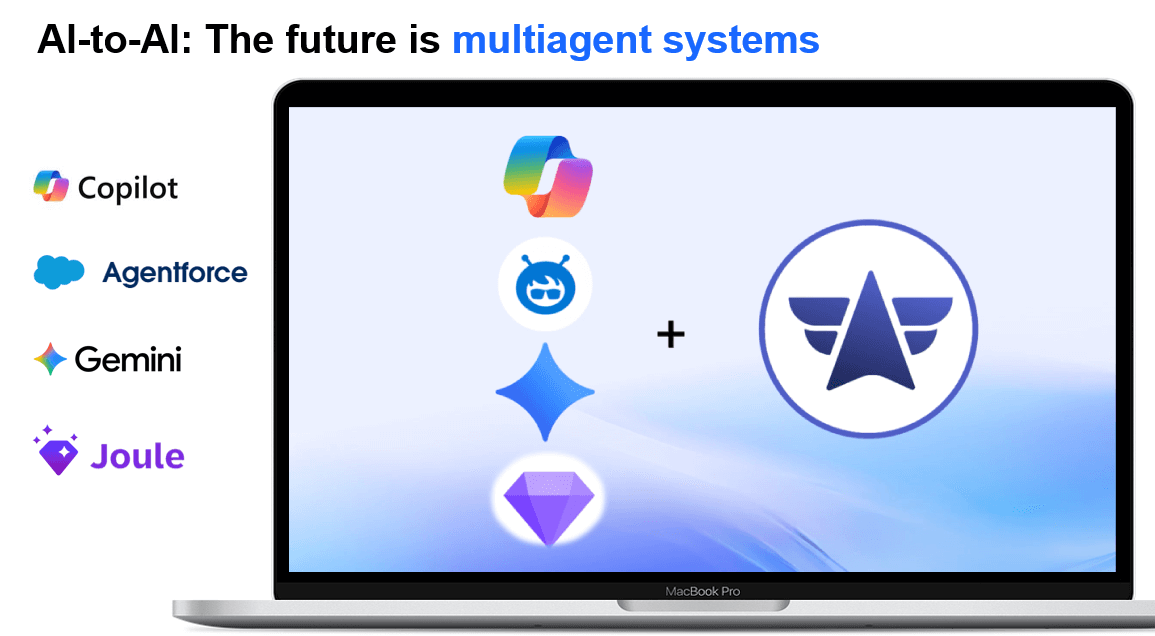
The same is true for Salesforce. We have integrated with Agentforce. And wherever Agentforce shows up, Agentforce knows there is Content Aviator as a companion. And Agentforce basically forwards questions to Content Aviator to get answers to certain content. So if a Salesforce user asks about a data set or a record, this user will get answers based on Salesforce data, but also on the content in OpenText.
Next one is Gemini Enterprise. Here we have an A to A integration. With Gemini, there has been an announcement about that. And you can call up the Content Aviator in an A to A scenario. And Gemini can interact with our agent with Content Aviator to get the answers for certain questions or just do things in our content management platforms. What we talked about before.
And last but not least, SAP, SAP Joule. We have an integration with Joule, with Joule skills with the Joule in SuccessFactors in this demo. And same idea here. If there’s questions from the user that requires content or tools from OpenText, both AI’s will interact. And you see you can get answers here based on information that is stored in OpenText.
Commitment to open standards: A2A and model context protocol
So OpenText is committed to open standards. Michael mentioned that already. We will support A2A, which is a key protocol to let agents communicate with agents. We will also support model context protocol, which allows access to Tools and Resources. So there’s a lot to come in this regard. And we are really committed to the openness. We are committed to integrate AI to AI. As you can see it here.
Intelligent filing: Automating document classification with Knowledge Discovery
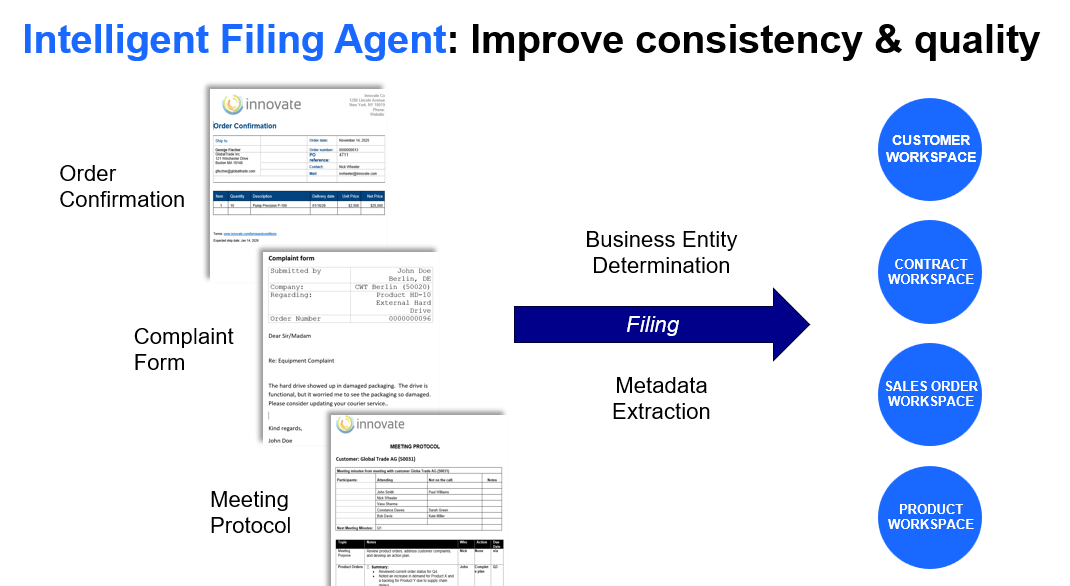
Marc Diefenbruch: So this is another scenario about intelligent filing. This is a typical problem many organizations have. There’s lots of documents coming in, and you need to decide where to put that document and assign metadata and put it in the right workspace. And here we have a use case with knowledge discovery that we heard about before. And making knowledge discovery available as agentic agents and tools that we can solve this problem. Basically, understand what these documents are and file it into the right workspaces. Extracting the metadata. Understanding what the business entity is, setting the permissions, setting the document types. Everything is automatically and the document finally lands in the right place of the system. Thank you very much, ladies and gentlemen. Marc.
OpenText customer story: Burgenland Energie – 20 years of partnership leading to AI success
Lindsay Sterret: So we’ve shown you what it looks like to get the foundation right. Now we want to show you what it actually looks like to do more with what you have. And somebody or an organization that’s doing that really well is Burgenland Energie. So, Romy, why don’t you come on up. Ramona Schneeberger from Burgenland Energie who by the way, traveled all the way from Austria to be here. So why don’t you start by telling us who Burgenland is and what your role is there.
Ramona Schneeberger (Burgenland Energie): Yeah. As the name already reveals, Burgenland Energie is a leading energy utility with about 1,000 employees serving about 300,000 residents in our area. And the division of this company was back then 14 years ago that we need to have this professional contract management in our company. Since back then the contracts were distributed all over the departments, and that was like a little bit frustrating for all our employees.
Lindsay Sterret: So how did your partnership with OpenText begin?
Ramona Schneeberger: It actually began over 20 years ago, and back then we had the idea to get this partnership even closer or more intensive. And we introduced the OpenText Content Management (Extended ECM) for our contracts, 14 years ago when I got employed. Because as I already said, had this idea to have this professional contract management in our company. So the peers from us or the coworkers are not frustrated working with contracts anymore. It’s fun working with contracts. And for that, we have the vision to make the best out of it.
Lindsay Sterret: You talked a lot about your team storing contracts and all sorts of different places, and the need to standardize on a single source of truth and to digitize all of those documents, right?
Ramona Schneeberger: Yes. So I can tell you a whole story how it began. Because back then, 14 years ago, we had contracts all our departments. And there was this one goal of our managing directors to have this central contract management in our company, to have this single source of truth. And that was the vision we followed over the years. And we had a tough time at the beginning. Because we manually needed to go through all those contracts. And the first thing we experienced was that it was a tough time actually finding all those contracts. Because I can tell you that contracts were like there was a part of the contract was in this department, and the other part was in another department. And to get the contracts together and to get all the additional information together in one place was a tough time, but we got to it.
Lindsay Sterret: Awesome. So your partnership, you said you’ve been with OpenText for about 20 years now. Your use of Extended ECM or content management has really evolved over that 20-year period. Can you tell us a little bit more about that? I think you said you’ve started with business workspaces. You’ve used business workspaces from the beginning. What came after that?
Ramona Schneeberger: So we needed a structure, since back then we had no structure at all. And the idea was we need a structure that fits to all of our departments to have a unit structure for the whole company. And that was a little bit tough, since everyone has their own expectations and needs. And to put all those expectations together and to find one structure that fits the whole company was of tough. But we then decided to get structure that follows type of contracts. So each contract is dedicated to one of our type of contracts. And behind that type of contract, we have metadata. And we also started to work with workspaces right away. Yeah. For us, it’s like a draw, getting to a virtual draw where all of our necessary information is stored. And you can find everything you need to understand the contract right away.
Lindsay Sterret: Yeah. You talked a lot about the journey of workspaces, metadata, OCR, SmartView. They’ve really evolved the platform over the 20 years. And that’s been a key to setting them up for what’s next, which is their use of content Aviator. So can you talk to us a little bit about the most impactful ways you guys are using Content Aviator today?
Ramona Schneeberger: Yeah, the journey actually started right away when I heard about the Content Aviator. And it was like as we in Austria say, it’s like the AI. And it’s like the highlight. Because we already had the information needed in the system. But to make it more efficiently for our coworkers, it’s necessary to have this additional benefit from the Aviator. So for us, we had this clear vision that we want to integrate the Aviator in our system. Because we right away saw the benefits which the Aviator brings us.
Lindsay Sterret: So you’re using Aviator for I think you said 50,000 contracts, pretty complex, lengthy documents. Can you elaborate a little bit more on how you’re using Content Aviator?
Ramona Schneeberger: As I already said, we have a journey of 14 years with OpenText. And the contracts used to be not as complex as they are nowadays, but we are using the Aviator right now in our company to just find information much faster, to summarize the information, and then to make just better decisions.
Lindsay Sterret: Freeing up a lot of your contract managers to do more strategic work. That time translates to money, obviously. Being able to do
Ramona Schneeberger: Much, much more time to just do quality work.
Lindsay Sterret: Awesome. As you think about the evolution of your strategy, what do you think is next for Burgenland?
Ramona Schneeberger: It was exciting in the morning to hear what’s coming next from OpenText. And with the Aviator studio, I’m very excited to go with the speed of OpenText. Because in Austria, it’s sometimes very tough to make a change in a company, especially when it’s governed by the government. And therefore, it needs a lot of effort to do the change. Yeah.
Lindsay Sterret: You talked a lot actually about just wanting to introduce Aviator to more of your colleagues. Continuing that education, the learning journey, getting tighter on prompt engineering, things like that. Anything else that you want to elaborate on?
Ramona Schneeberger: It’s one thing to get the Aviator ready in the system. But the other thing is to introduce the Aviator to my colleagues. And therefore, you need to show that the Aviator works. And we have also learned that it’s not that easy. We need some prompt engineering sessions to learn how to use the Aviator correctly. And as soon as we understand how the Aviator works and how we can get the best out of it, we’re going to roll it out over the whole company.
Lindsay Sterret: Awesome. Well, thank you so much for being here. Thanks for making the journey. It’s a pleasure to have you.
Ramona Schneeberger: Thank you.
Getting started: Three pathways to AI-ready content management
Michael Cybala: Thank you very much. Well, I live very, very close to Austria. I’m from Bavaria, Germany. So I know how difficult it is in our country, so to say, to implement things like that. So thank you for making the long way coming here, talking about your experience with Aviator. Thank you so much.
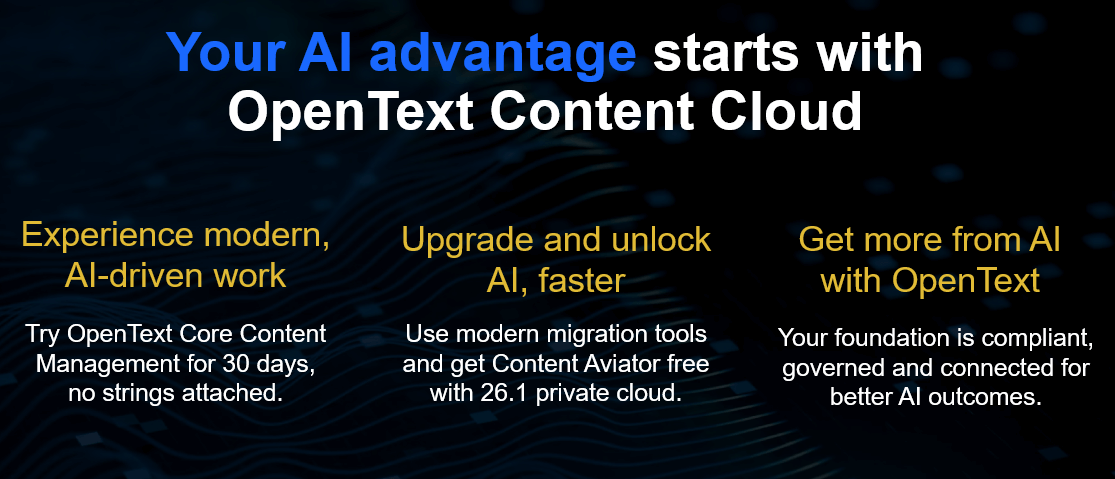
So what we’ve been talking about is the advantage in the Cloud you get and being ready for AI. So with Core Content, we’ve announced the most secure, intelligent platform for content management in the Cloud. It’s available for you. You can test it. You can use it 30 days, if needed.
Try Core Content Free for 30 DaysThe other part, which we consider very important, is upgrade. Upgrade to the most current versions, modernize, and then you get ready for AI. As a customer, we want to make that better easier for you with our migration products. And you will reduce the time, the effort. We will give you more automation. We will leverage AI to migrate you over. And with 26.1 you get AI for free.
And while you’ve hopefully seen with AI in context, there’s great results to be achieved. We’ve heard one example here. We’ve heard how to get ready for AI with knowledge discovery. You will see another great example around HR and the use of Aviator and how agents actually work together tomorrow on Main stage. So I look forward to that. So there’s a lot in it for you.
And last but not least, there’s a set of very interesting OpenText World sessions. Depending on what you’re using. And I obviously encourage you to go to those sessions, listen to the experts from my team, and from Lindsay’s team, and from Marc’s team. They walk you through the latest innovation and the greatest, whether it’s around Documentum. Again, workspaces are available, whether it’s for content management, where really good things are happening with the new user experience and all these things. And there’s a bunch of sessions around our SaaS approach with Core. You can get deeper in what the product or the platform can deliver for you today. Thank you for being here. Thank you for being an OpenText customer, and have a great day and a great show here.
GARTNER is a registered trademark and service mark of Gartner, Inc. and/or its affiliates in the U.S. and internationally, Magic Quadrant is a registered trademark of Gartner, Inc. and/or its affiliates and is used herein with permission. All rights reserved.